Dolby Atmos 사운드 바 오디오 데모 플레이어는 어떻게 작동합니까?

Dolby Atmos 사운드 바 오디오 데모

약간 기술적이지만 여전히 매우 간단합니다.

그러나 당사의 사운드 바 오디오 플레이어는 Dolby Atmos 오디오를 전혀 디코딩할 수 없습니다. 그러면 Atmos 몰입형 오디오 경험을 구동하고 전달하기 위해 어떻게 작동합니까?

모든 브랜드 4K LCD TV와 Atmos 사운드 바에는 Atmos 디코더가 있으므로 내장형 Atmos 디코더가 필요하지 않습니다. Atmos 디코더를 사용하지 않는 이유는 무엇입니까?

HDMI CEC 컨트롤을 통해 오디오 RAW 데이터를 사운드바 또는 4K LCD TV 스피커로 전송하고, CEC 컨트롤을 통해 사운드 바 오디오 플레이어에서 TV 리모컨 코드를 통해 볼륨 컨트롤을 관리할 수 있습니다.

장치를 함께 연결하여 작동하게 하려면 어떻게 해야 합니까?

아주 간단합니다.

  1. Dolby Atmos 사운드바가 장착된 사운드바 오디오 플레이어의 1번 HDMI 출력 포트를 HDMI 입력 포트에 연결하고 HDMI 포트를 통해 4K LCD TV에 라인아웃합니다.

2nd, 다른 사운드바를 사운드바 오디오 플레이어의 다른 HDMI 포트에 연결합니다.

이제 푸시 버튼 셀렉터를 눌러 LCD TV와 사운드바 간에 사운드를 전환하면 다른 사운드바에서 Dolby Atmos 효과를 경험하고 비교할 수 있습니다.

다음 비디오는 이러한 기술적 세부 사항을 시각적으로 이해하는 데 도움이 됩니다.

오디오, 비디오, LED 조명 올인원 맞춤형 소매 솔루션

Audio, video and LED lighting all-in-one custom retail solution

For most brands, retailers, store installers, or retail display makers, combining disparate retail electronics hardware into an all-in-one system with software interaction is not an easy task. We are well positioned to address these challenges, building modularized software and hardware into smart solutions with affordable technology for everything in the retail space, but then investigate them and then redesign or develop them into solutions.


The following example shows how to implement an audio demo using interactive elements such as motion sensors, audio, video, LED lights, and push buttons.


>>> When a retail shopper goes out of motion detection, the display will only show a still image or a muted video loop.


>>> The display enters an engaging video playback until a shopper’s movement (approaching the display) is detected.


>> When the buyer uses one of the push buttons (or touchpad or rotary encoder buttons), the display moves to the selected video with LED strip lights. After playing once, go back to playing the charm video and turn off the LED strip lights.

Audio Video LED Lighting Customized Retail Solution

In some retail applications, the customer only needs a pure audio player to engage the buyer only with the audio signal, as in the following example.

Pure Audio Demonstration 오디오 비디오 LED

VideoScreen is not required in this scenario. The rest of the user experience is similar to the previous example, but with additional user interface elements added. A line-in of personal audio devices, allowing shoppers to hear and experience their favorite songs and easily compare and find expected audio quality. .

소매 광고의 사용자 인터페이스 요소로서의 RFID 태그

소매 광고의 사용자 인터페이스 요소로서의 RFID 태그

RFID는 다소 복잡해 보이지만 우리는이를 단순화합니다. 우리의 RFID 라이터 및 리더 콤보를 사용하여 손으로 뒤집는 것처럼 쉽게 RFID 태그 코드를 작성하십시오. 그런 다음 미리로드 된 비디오 이름을 태그 코드와 일치시킵니다.


2 분 안에 RFID 라이터 및 리더 콤보를 사용하는 방법을 알아보세요 (RFID 라이터 사용 설명서 다운로드).


일반적으로 RFID 기반 소매 화면에는 두 가지 유형의 사용자 활성화가 있습니다.


픽업 및 학습

쇼핑객은 소매 데모 RFID 리더 패드에서 항목 중 하나를 선택하면 해당 비디오로 소매 데모가 활성화됩니다 (옵션 LED 조명 변경).

RFID Retail Screen Application

내려 놓고 배우기


쇼핑객은 소매 데모 RFID 리더 패드에서 떨어진 RFID 태그가있는 일부 소매 품목을 RFID 리더 패드에 놓은 다음 해당 비디오로 소매 데모를 활성화합니다 (옵션 LED 조명 변경).RFID Retail Screen Put Item Down


Android 디지털 사이 니지 플랫폼

Gain knowledge and expertise in network digital signage through hard experience in the era of microcontroller network signage before ARM and Android dominated.


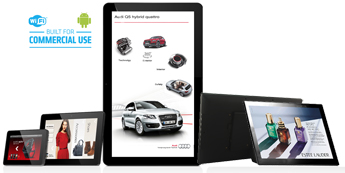
Android Digital Signage Platform with Web Browser-based CMS is cloud-based and scalable for digital signage data transfer requirements. Customers can remotely manage their connected digital signage displays from anywhere in the world and support:

One). Manage users with different permission levels (eg device administrators, company administrators;

2). digital signage media content management, playlists and scheduling;

three). posting, logging, and engagement statistics;

networked digital signage maker

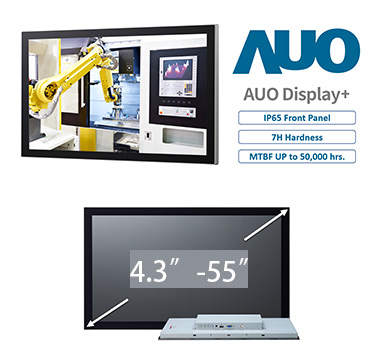
No matter what your in-store digital menu boards for chain restaurants with location-based playlists and schedules, or catalog totems in car dealer showrooms across the country with event-driven promotions, we have prepared a network digital signage solution ready. A variety of hardware options, including: LCD TVs with HDMI ports, retail tablets, digital menu boards, and set-top boxes that connect to giant totems.

Android Digital Signage in diverse options 안드로이드 디지털 사이니지

맞춤형 솔루션

AOK는 맞춤형 솔루션을 표시합니다.

고객이 자신을 차별화하고 시장에서 두각을 나타내도록 돕는 제품 전략으로 우리는 맞춤형 디지털 사이니지 솔루션을 지속적으로 개발하고 있습니다. 이 과정에서 우리는 기존의 아이디어, 규칙 및 절차를 뛰어 넘는 가치를 전달하기 위해 상상력을 사용합니다. 그러나 가장 먼저 가장 중요한 것은 고객의 소리에 귀를 기울이는 것입니다.

Proof-of-concept Prototyping

우리의 경험을 활용하여 고객이 원하는 제품을 디자인하십시오. AOK 디스플레이는 다음과 같은 다양한 사용자 정의 옵션을 제공합니다.

  • 다양한 화면 크기 및 하드웨어 구성
  • 맞춤형 마감재;
  • 개인 라벨링 및 포장;
  • 맞춤형 도구/인클로저;
  • 밀봉 및 차폐;
  • 특수 케이블 및 전원 솔루션;
  • 사내 프로토타이핑;
  • 개념 증명 모델;
  • 컴플라이언스 엔지니어링;
  • 글로벌 안전 인증: UL, CSA, FCC, CE, CTICK, VDE 및 TUV;

Custom tooling

소매 용 오디오 POP 사례 연구 : Panasonic 용 헤드폰 및 스피커 데모 벤치

headphone-speaker-demonstration-system-configuration

소매 고정 장치는 평면 금속 시트에서 CNC (컴퓨터 번호 제어) 기계로 만들어져 스프레이 페인팅을 추가하여 색상을 맞춤 설정합니다. 사용자 인터페이스에는 LCD 패널, 도광판, 버튼 및 라인-인 케이블이 포함됩니다. 3 가지 버튼 유형, 정전 식 터치 버튼 (사용자 참여가 용이함), 회전 버튼, LED 조명 푸시 버튼이 있습니다.

light-conducted-plate-in-demonstration-bench

도광판은 레이저로 만든 피치 매트릭스가있는 아크릴 판으로 만들어져 결국 측면의 LED 스트립에서 전체 판으로 빛을 확산시킵니다. 전원 공급 장치는 마더 보드의 전원 포트에서 제공됩니다.

board-for-rotary-buttons-on-audio-demonstration-bench

로터리 버튼은보다 자연스러운 방식으로 볼륨을 조절하는 데 사용되며 트랙 또는 출력 채널 스위치에 대해 “선택을 위해 누르기”기능이있는 로터리 버튼을 사용하는 것은 선택 사항입니다.

personal-audio-device-line-in

헤드폰 및 스피커 데모는 개인화되고 사용자의 개인 오디오 장치 라인 인을 지원하여 쉽게 비교할 수 있도록 자신이 좋아하는 노래를들을 수 있습니다.

GPIO-port-power-port

버튼 제어용 GPIO 포트 및 조명 전원 공급 용 전원 포트.

retail-audio-demo-open-frame

구현 다이어그램의 내부보기

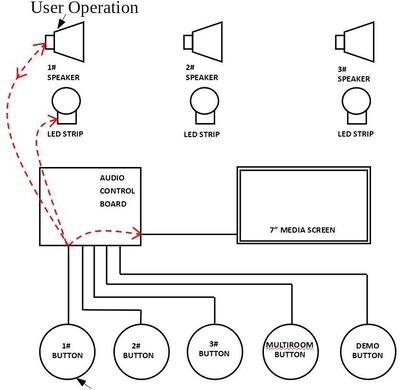
직렬 명령을 통해 데모 항목과 통신하는 대화 형 소매 솔루션

직렬 명령을 통해 데모 항목과 통신하는 대화형 소매 솔루션

고객이 “소매 모드”에서 장치를 구축했거나 일부 소매 데모 장치를 만든 경우, 소매 버전 장치의 성능은 물론 자연스럽고 진정한 품질을 활용하여 고객과 통신하는 데모 솔루션을 만들어야 합니다.


멀티룸 스피커 상황을 가정하면 고객은 3.5mm 포트 형태의 직렬 포트가 있는 소매 버전 스피커를 만들어 소매 대화형 데모와 상호 작용한 다음 미디어 플레이어 앱과 이벤트 트리거 명령을 그에 맞게 재설계합니다. 클라이언트의 소매점. 조정하다. 버전 항목. 우리는 이미 시스템을 처음부터 모듈화했기 때문에 프로젝트가 너무 작거나 복잡하지 않고 고객의 요구에 신속하게 대응할 수 있습니다.

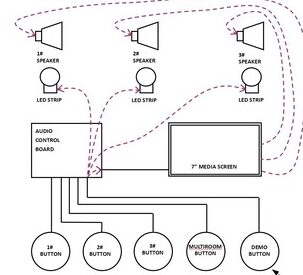
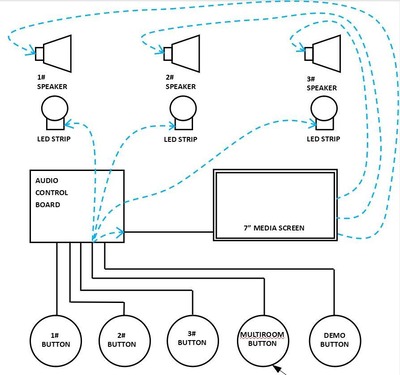
위 애니메이션의 경우 스피커에는 재생 목록이 미리 설정된 내장 미디어 플레이어가 있으며 1#, 2#, 3# 버튼 모드는 자체 음악 트랙을 재생하고 사용자는 기본 버튼 역할을 합니다. 데모 스피커, 데모 비디오가 화면에서 재생되며 혼합하지 마십시오. 비디오와 오디오는 다른 시스템과 완전히 분리됩니다.


이 창의적인 소매 솔루션에 대해 자세히 알아보려면 여기에서 사양을 다운로드하십시오.

푸시 버튼이있는 4K 사운드 바 소매 데모

푸시 버튼이있는 4K 사운드 바 소매 데모


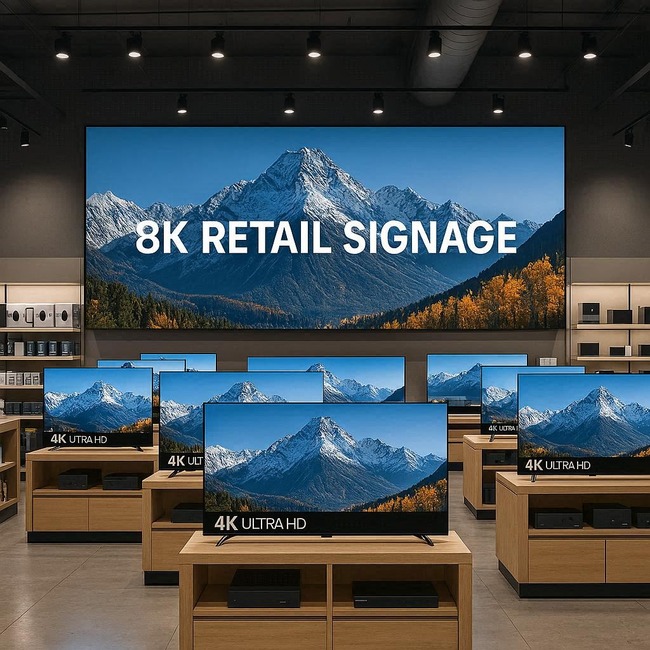
시스템은 푸시 버튼과 4K LCD TV를 사용하여 쇼핑객이 TV 및 사운드 바의 음질을 비교할 수 있도록하고, 사운드 바 데모는 기본 루프 비디오로 자동 전원을 공급하고 사용자가 푸시 버튼으로 활성화하면 매력 비디오로 전환합니다. 중단없이 LCD TV와 사운드 바 사이를 전환했습니다. LED 조명은 소매 시연 중에 음악 스위치와 일치합니다.

Sound Bar Retail Demonstration Application

이 사운드 바 소매 데모 스테이션의 구성 요소 목록 :


>> 사운드 바 데모 1080P 버전 또는 4K 버전;


>> LCD TV (HDMI-in 화면);


>> 12V RGB LED 스트립;


>> 사운드 바;


>> 푸시 버튼;


소매 사용자 요소 변형 :


특정 사용자 시나리오에 따라 사용자 인터페이스가 프로젝트에 맞게 수정 될 수 있으며 데모 사운드 바의 수량은 1 ~ 8 일 수 있습니다. 다음을 포함하되 이에 국한되지 않는 모든 사용자 인터페이스 요소를 지원하도록 소프트웨어를 사용자 정의 할 수 있습니다.


>> 푸시 버튼;


>> 용량 성 터치 패드 / 터치 버튼;


>> 터치 스크린 안드로이드 또는 비 안드로이드;


>> 모션 센서 (함께 1pc 또는 2 pcs);


>> 바코드 리더;


>> RFID 리더;


>> 개인용 오디오 장치 라인 입력;


>> 자석 / 홀 센서;

소매 및 숙박업을위한 AOK 디스플레이

AOK Displays Retail & Hospitality Digital Signage Players는 고객이 마케팅 효과를 높이고 투자 수익을 높이며 마케팅 메시지를 전달할 수 있도록 지원합니다.

AOK Displays For Retail & Hospitality Digital Signage

World Retail Congress에 따르면 소매 및 접객을위한 디지털 사이 니지 배포의 이점은 놀랍습니다.

> 매력적인 브랜드 경험 만들기;

> 고객이 매장에서 구매 결정을 내릴 수 있도록 지원합니다.

> 옴니 채널 전략 활성화;

> 오프라인에서 온라인으로의 O2O 전략을 위해 “브릭”을 “클릭”과 연결


AOK Displays는 7/24/365를위한 최고 수준의 상용 장치뿐만 아니라 검증 된 솔루션 파트너 추천 및 사용하기 쉬운 자체 콘텐츠 저작 도구를 포함하여 콘텐츠 제작 지원을 포함한 고객 관리 솔루션을 제공합니다. 중소기업 구매자의 DIY 그들의 콘텐츠.

헤드폰 / 스피커 소매 쇼룸 제품 선택 및 콘텐츠 배포

Headphone/Speaker Retail Showroom Product Selection and Content Distribution

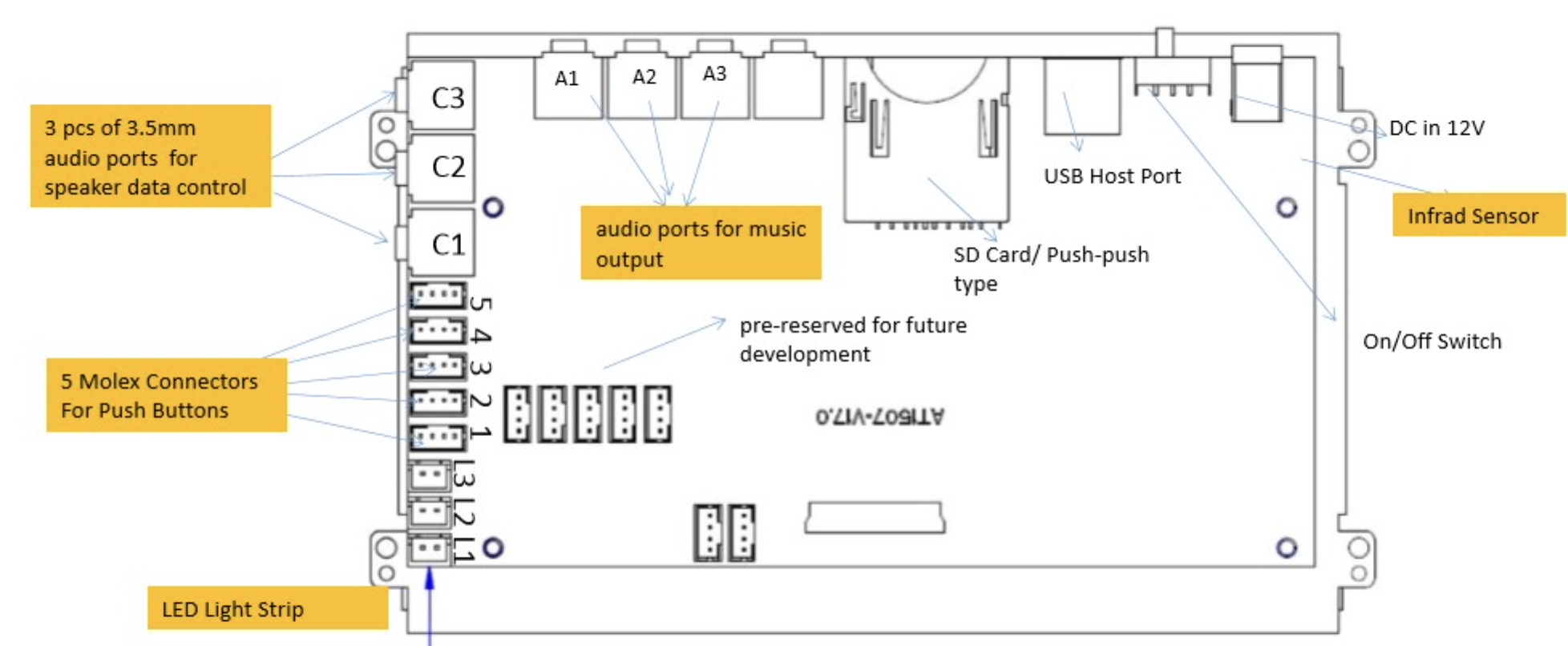
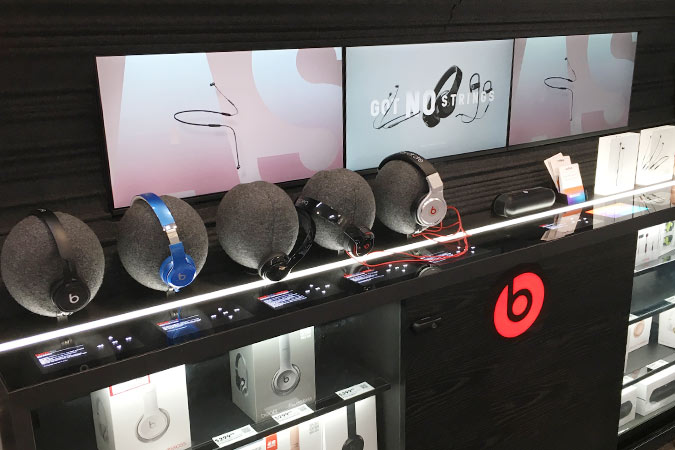
Headphones & Speakers Retail Showroom Product Selection Audio Players, our solutions are fully developed according to the general needs of the retail sector and include up to 6 3.5mm headphone outputs, audio line-in 3.5mm port, USB port for powering powered speakers in the demo Equipped with a Molex connector that accepts a push button for user activation.

Headphone Retail Showroom Product Selection

A common user scenario is to press a button the first time to send audio to a dedicated output and press the button again to skip to the next track. For headphone demos, it’s common for the client to auto power on and loop the default file sending audio to all channels, or power on to stay in standby mode. Some projects require LED lights to highlight selected products, some simply need LED lights to turn on/off, and some projects require LED lights to gradually crowd or breathe.


Not all audio demo solutions are designed equal. We can customize your merchandising goals and turn them into achievable action plans.


Retail User Element Variants:


Depending on the specific user scenario, the user interface can be modified to suit the project, and the quantity of the demo soundbar can be from 1 to 8. You may customize the software to support any user interface element, including but not limited to:


>> push button;


>> Capacitive touchpad/touch buttons;


>> Touch screen Android or non-Android;


>> Motion sensor (with 1pc or 2pcs);


>> barcode reader;


>> RFID 리더;


>> Personal Audio Device Line In;


>> Magnet/Hall sensor;


>> Analog to Digital Converter;