Battery-driven retail display solution

battery driven retail display solution
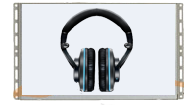
This Osmo battery driven screen is based on a low-power 10.1 inch video screen, powered by a push button and 8XD battery pack.


To power your retail storytelling without AC power, Our battery-driven retail screen delivers reliable video playback using standard D batteries, making it ideal for shelves, endcaps, dump bins, and pop-up fixtures where mains power is unavailable or simply inconvenient.


What it does


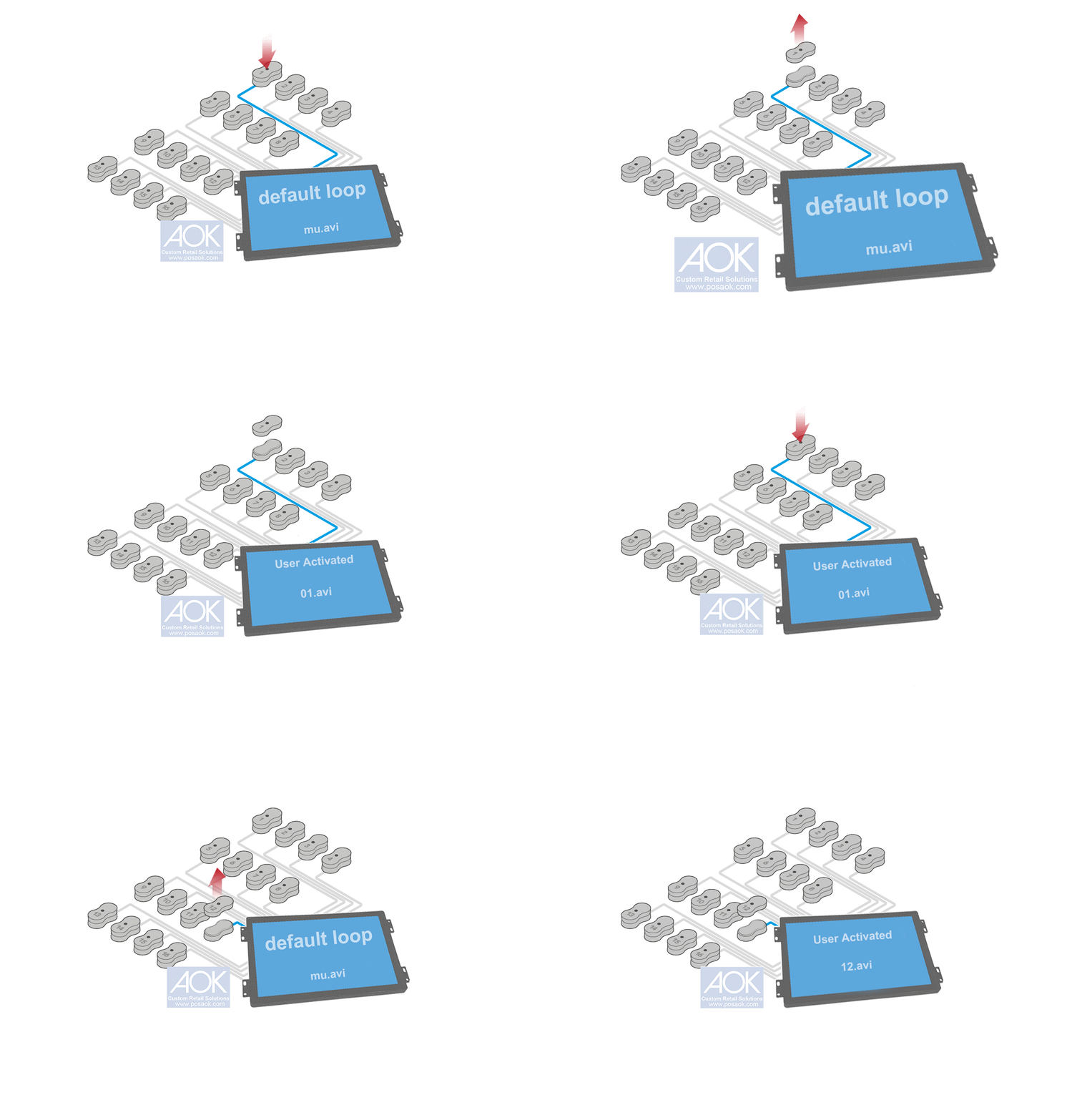
Our battery-operated solution is built for instant video-on-demand at the point of purchase. The screen plays your product video when shoppers engage—triggered by a motion sensor (PIR),  a LED push button or a lift sensor. These video triggers work as a dedicated battery power manager to optimize energy usage handling wake/sleep control, and keeping playback stable across long deployments.


The problem it solves


Retail teams often face a frustrating tradeoff: either redesign fixtures for AC power, run cables that are unsafe or unattractive, or abandon digital content altogether. Our battery solution removes that headache—so you can add motion-activated video anywhere, without electricians, outlets, or messy wire routing.


Why it’s different


Unlike typical “portable screens,” this platform is engineered for ultra-low operating power. With 8× D batteries, it can drive a 15-second video up to 3,600 times, supporting up to 90 days of on-shelf operation (usage dependent). Even more important for conversion, it wakes fast: from shopper engagement to video loading in under 2 seconds, keeping attention at the exact moment of decision.


Sizes & form factors


Available from **3.5″ to 18.5″, with open-frame options for custom fixture integration or framed versions for quick installation and clean retail presentation.
 

Marshall Multi-room audio demonstration explained

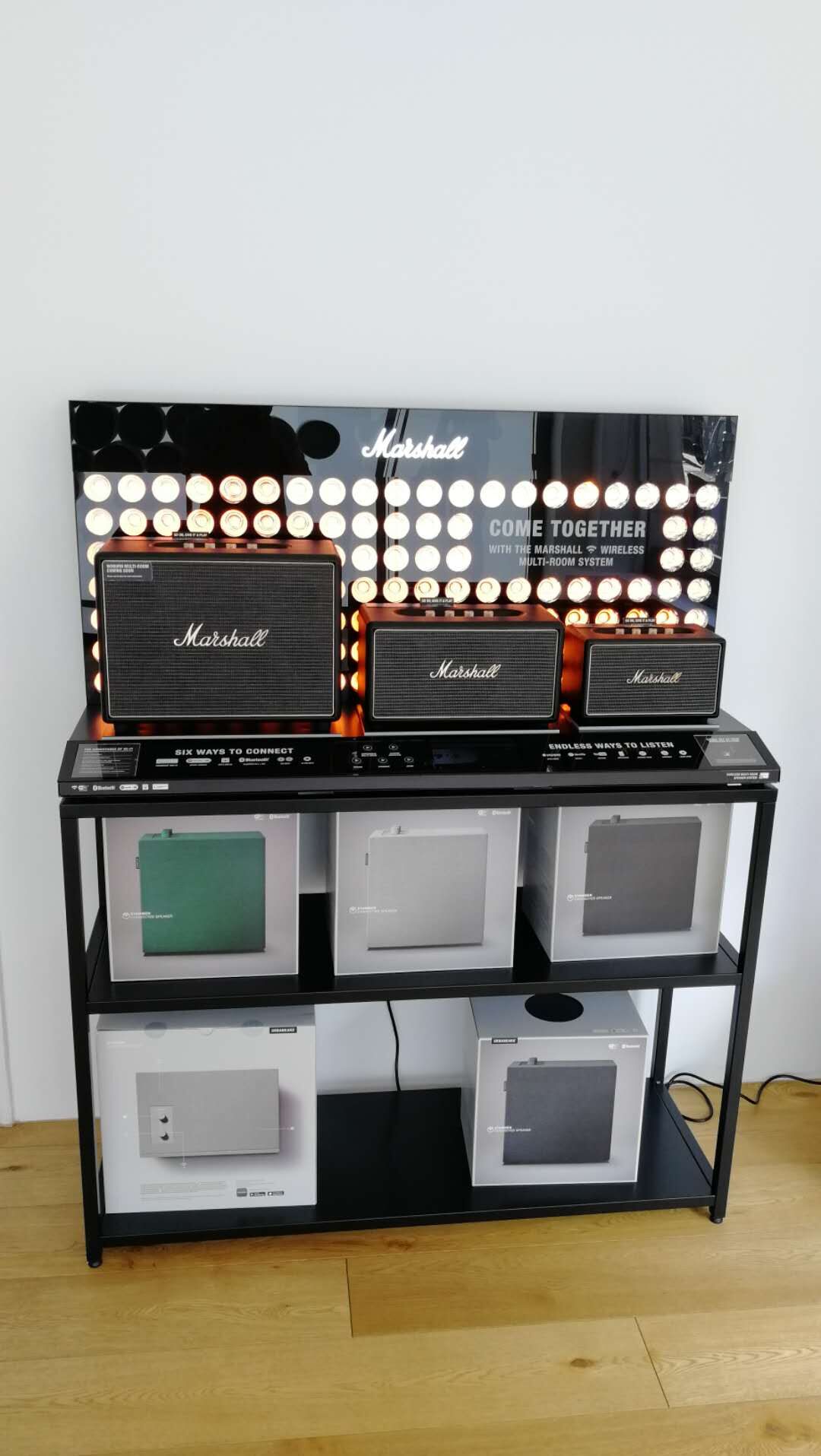
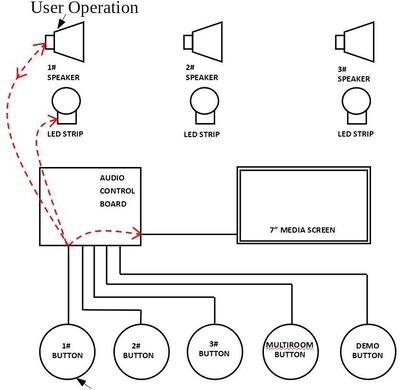
The project’s goal is to showcase the Marshall family speakers with multi-room sync capability. While Marshall wants to use its retail-demo version media player and provide us the I/O to work along with their hardware, our media player will corresponde to user activations either on Marshall speaker native buttons or push buttons in the retail display.Marshall multi-room speaker display


User Experience

Power on the unit, it goes into standby.

Single speaker modeSingle speaker demo

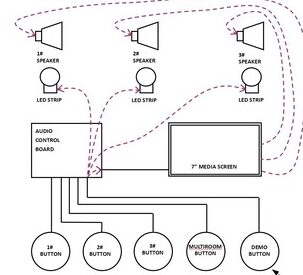
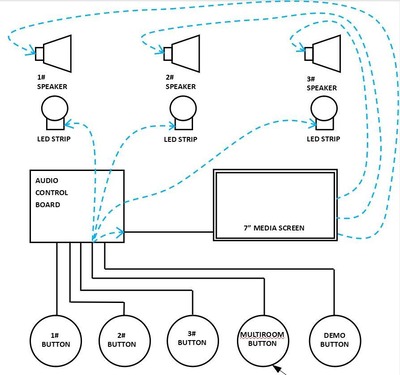
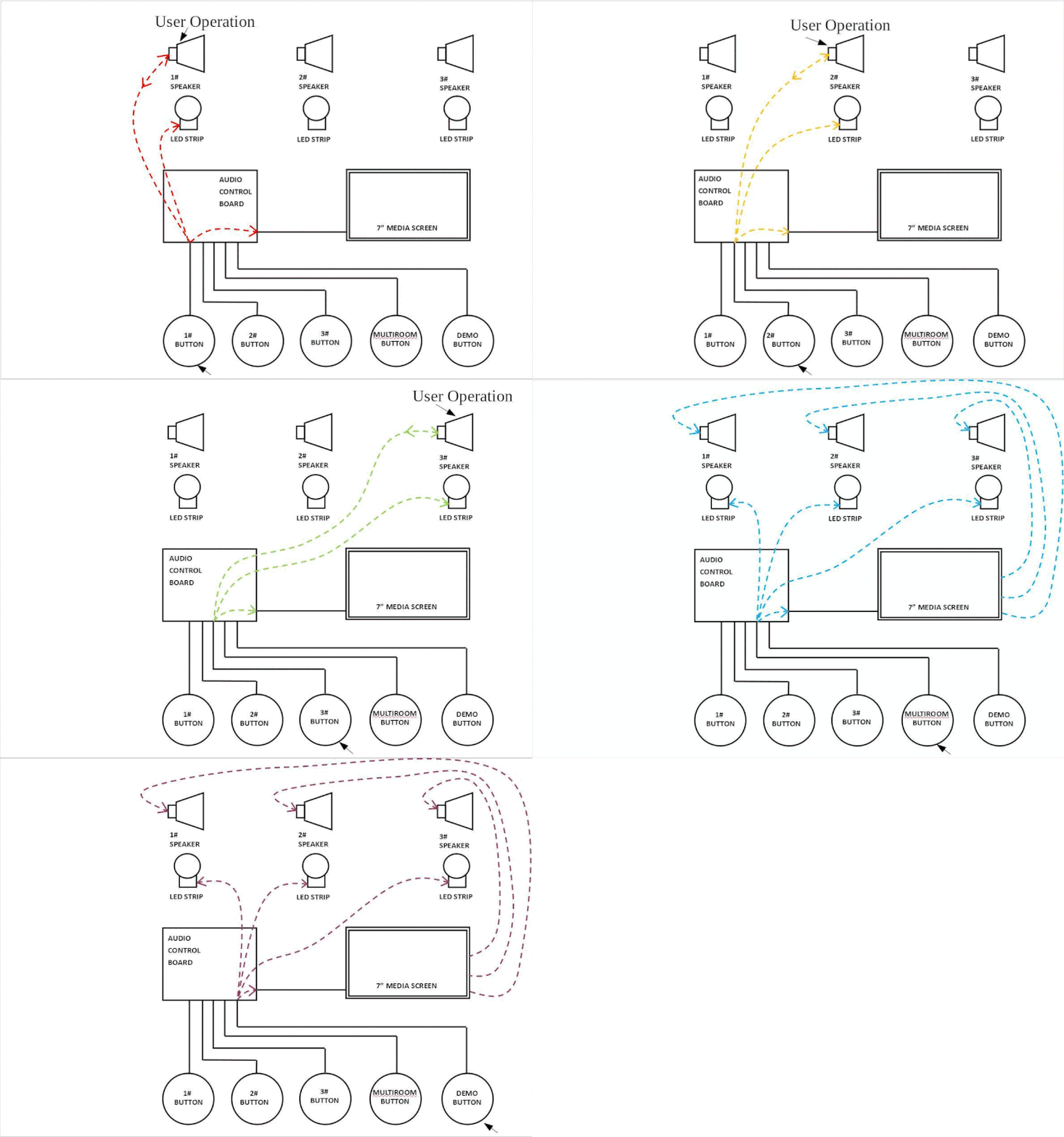
Once the shopper operates the knob on the speaker or the speaker’s selection push button, the speaker plays the retail-mode tracks and a designated demo video will be triggered on the 7 inch video screen, the LED strip will be turned on; when the user operates on the speaker but the video is going to the end, there will be a still image displaying until the user leaves away ( time-out ) or switches into other speakers or demo mode ( push button operated system overview and multi-room sync ).

System Overview demo

System overview mode

Press the demo button, The video player will send the audio into all the speakers with the designated demo video playing. All the LED strips will be turned on.

Multi-room demo

Multi-room speaker demo

Press the multi-room button, the video play will send the audio into all the speakers with the designated multi-room demo video playing, all the LED strips will be turned.


Components List

  • 7-inch video screen x 1pc;
  • 3.5mm to 3.5mm audio cable x3,  as data control between speakers and video screen
  • 3.5mm to 3.5mm audio cable to feed audio into speakers x3
  • LED strips x3
  • LED push buttons x3

ConnectionsMarshall audio controller connections

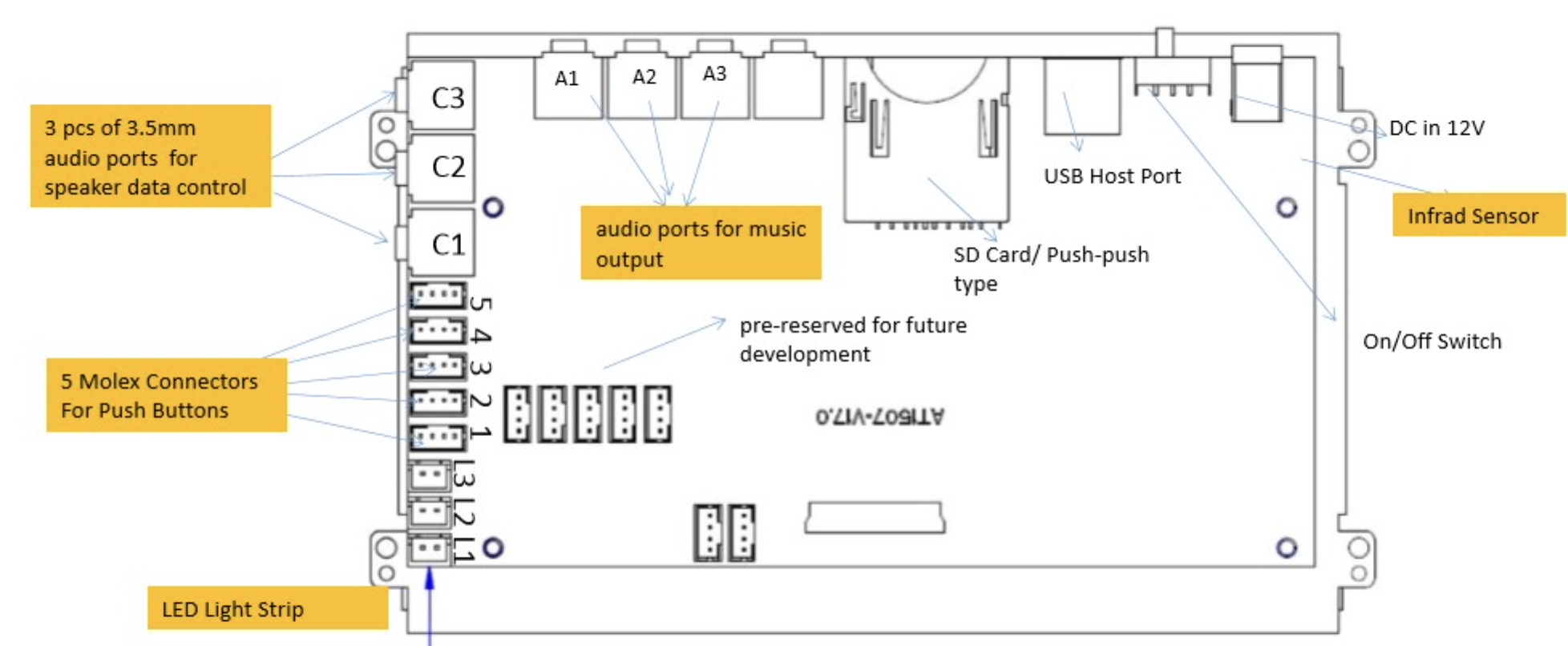
  • A1, A2, A3: Audio Output To Speakers Via 3.5mm to RCA;  A1 To Woburn; A2:To Stanmore; A3 to Acton;
  • C1, C2, C3: Data Control To Speakers; C1 For Woburn; C2 For Stanmore; C3 For Acton;
  • 1,2,3,4,5: Molex Connector For Push Buttons; 1 For Woburn; 2 For Stanmore; 3 For Acton; 4 For System Overview; 5 For Multi‐room;
  • LED Strip L1 For Woburn; L2 For Stanmore; L3 For Acton;

Challenges & Our Innovation

Customers need an ideal feature as below:

If the shopper presses a pre‐set button on one of the speakers during the Multiroom function (or System overview ) that specific speaker becomes active and the display switches to single speaker mode again.

But the speaker’s native buttons remain idle during multi‐room or system overview mode, this is Marshall speakers’ firmware issue, in this way, operation on pre‐set selection buttons have no feedback, as the speakers have no feedback to that operation.

After testing, we found that Marshall’s firmware has an exit delay for system overview mode and multi-room mode. So during such a delay, the indicator LED on the speaker is on to show status of Multi‐room or System overview for 6 seconds before it is off and operation on pre‐set buttons could generate feedback from the speakers.

In order NOT to get the user confused, we added a still frame picture at the end of the video demo, and the duration of this still frame picture can be customized via on screen menu of the video screen accessing via remote control.

Headphone / Speaker Retail Showroom Product Selection & Content Distribution

Headphone / Speaker Retail Showroom Product Selection & Content Distribution

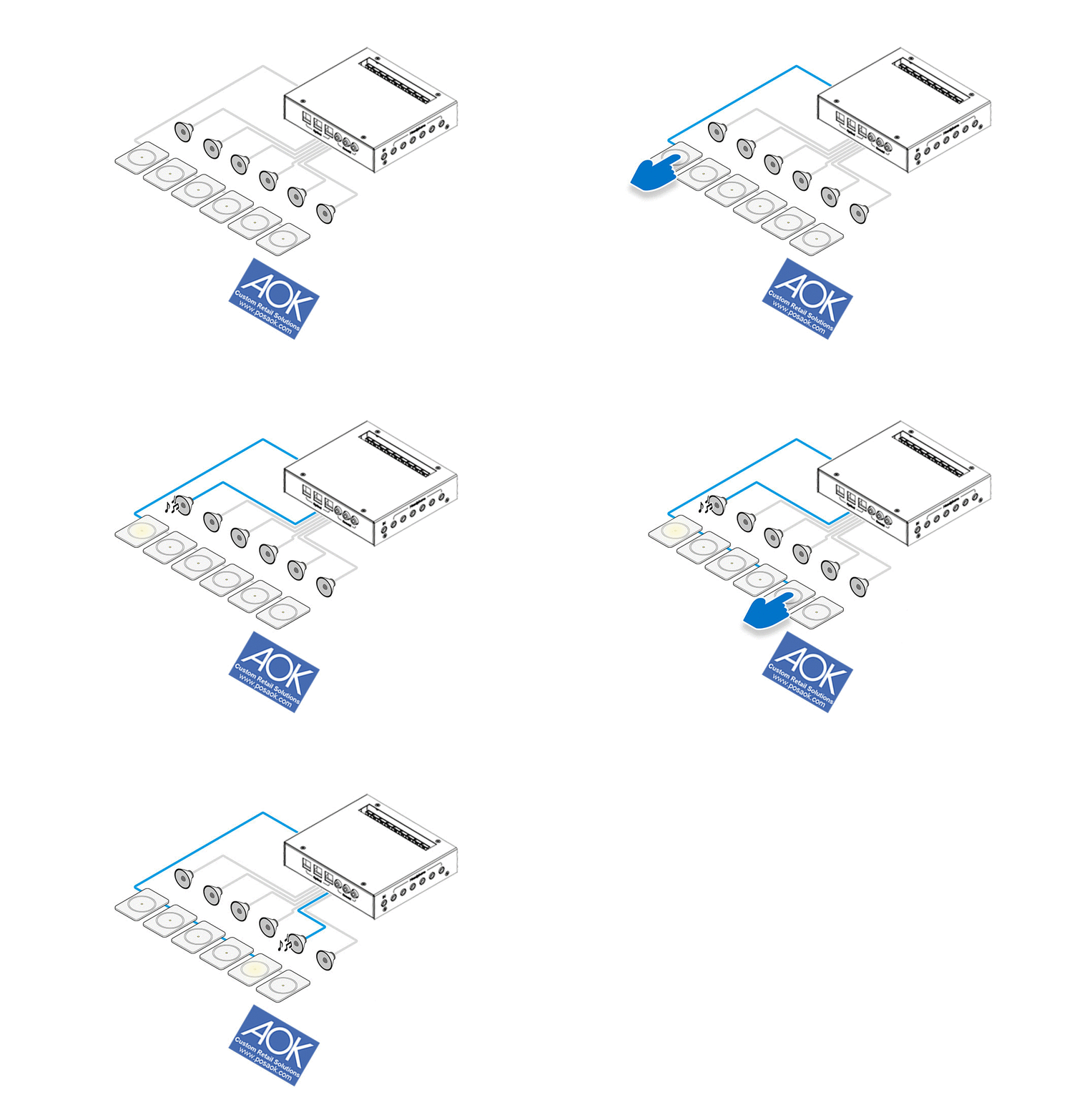
Headphone & Speaker Retail Showroom Product Selection Audio Player, Our Solution Is Totally Developed According To The Typical Needs In The Retail Field, With 3.5mm Headphone Output Up To 6 pcs, With Audio Line-in 3.5mm Port, USB Port To Supply Power For Powered Speakers In Demonstration, Molex Connectors On Board To Accept Push Buttons For User Activation.

Headphone Retail Showroom Product Selection

Typical User Scenario Is To Send Audio To Dedicated Output For The First Time Button Press, And Press The Button Again To Skip To Next Track; For Headphone Demonstration, It Is Also Common For Clients To Auto Power On And Loop The Default File Sending Audio To Every Channel, Or Power On Keeping Standby Mode; Some Projects Require LED Lighting To Highlight The Selected Product, Some Require LED Lighting To Simply Turning On/Off, Some Require LED Light To Be Booming or Breathing Gradually.

Not Every Audio Demonstration Solution Is Designed Equally, We Are Able To Customize And Turn Your Merchandising Objectives Into An Achieveable Plan Of Action.

Retail User Element Variations:

Depending On The Specific User Scenario, User Interface May Be Modified Project To Project, The Quantity Of Demo Sound Bar May Be 1 to 8; We Can Customize The Software To Support All The User Interface Elements Including But Not Limited To:

>>Push Button;

>>Capacitive Touch Pad /Touch Buttons;

>> Touchscreen Android Or Non-Android ;

>>Motion Sensor ( 1pc or 2 pcs together );

>>Barcode Reader;

>> RFID Reader ;

>>Personal Audio Device Line-in ;

>>Magnet / Hall Sensor;

>>Analogue To Digital Converter;

AOK Displays For Retail & Hospitality

AOK Displays Retail & Hospitality Digital Signage Players help customers increase marketing effectiveness, return on investments and take their marketing messages forward.

AOK Displays For Retail & Hospitality Digital Signage

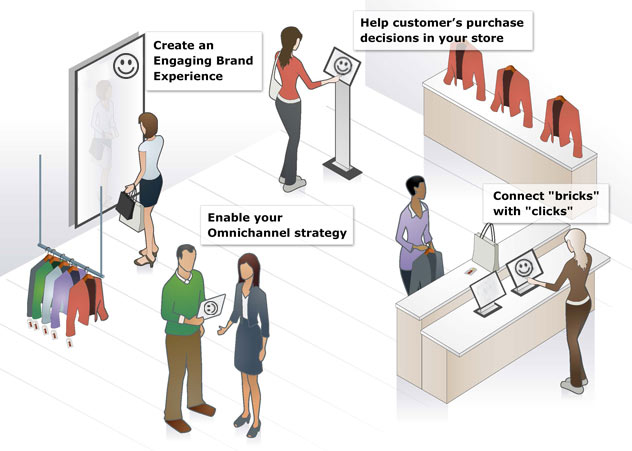
The benefits of deploying digital signage for retail & hospitality are remarkable according to World Retail Congress.
> Create Engaging Brand Experience;
> Help Customers Make Purchase Decisions In The Store;
> Enable Your Omnichannel Strategy;
> Connect “Bricks” With “Clicks” For Offline-To-Online O2O Strategy
AOK Displays Offers Not Only The Top-level Commercial Device For 7/24/365 With Heavy Duty, But Also Customer-Care Solutions With Content Creation Support Including Verified Solution Partners Referral As Well As Our Own Easy-To-Use Content Authoring Tools For SME buyers’ DIY Their Content.

4K Sound bar Retail Demonstration With Push Buttons

4K Sound bar Retail Demonstration With Push Buttons


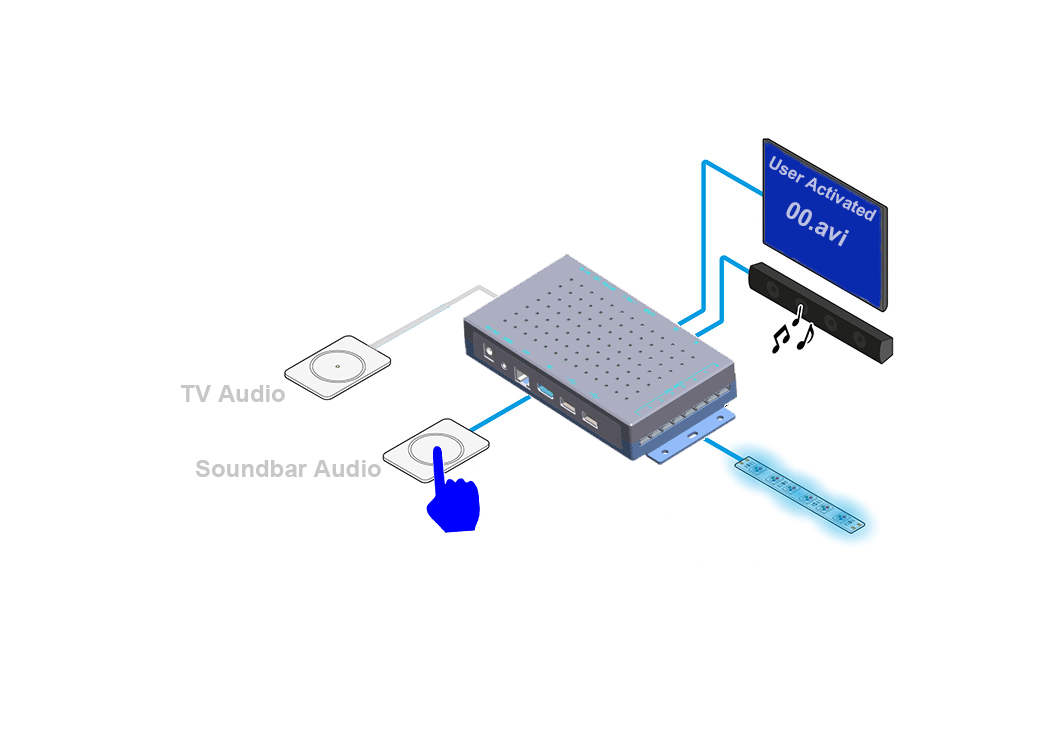
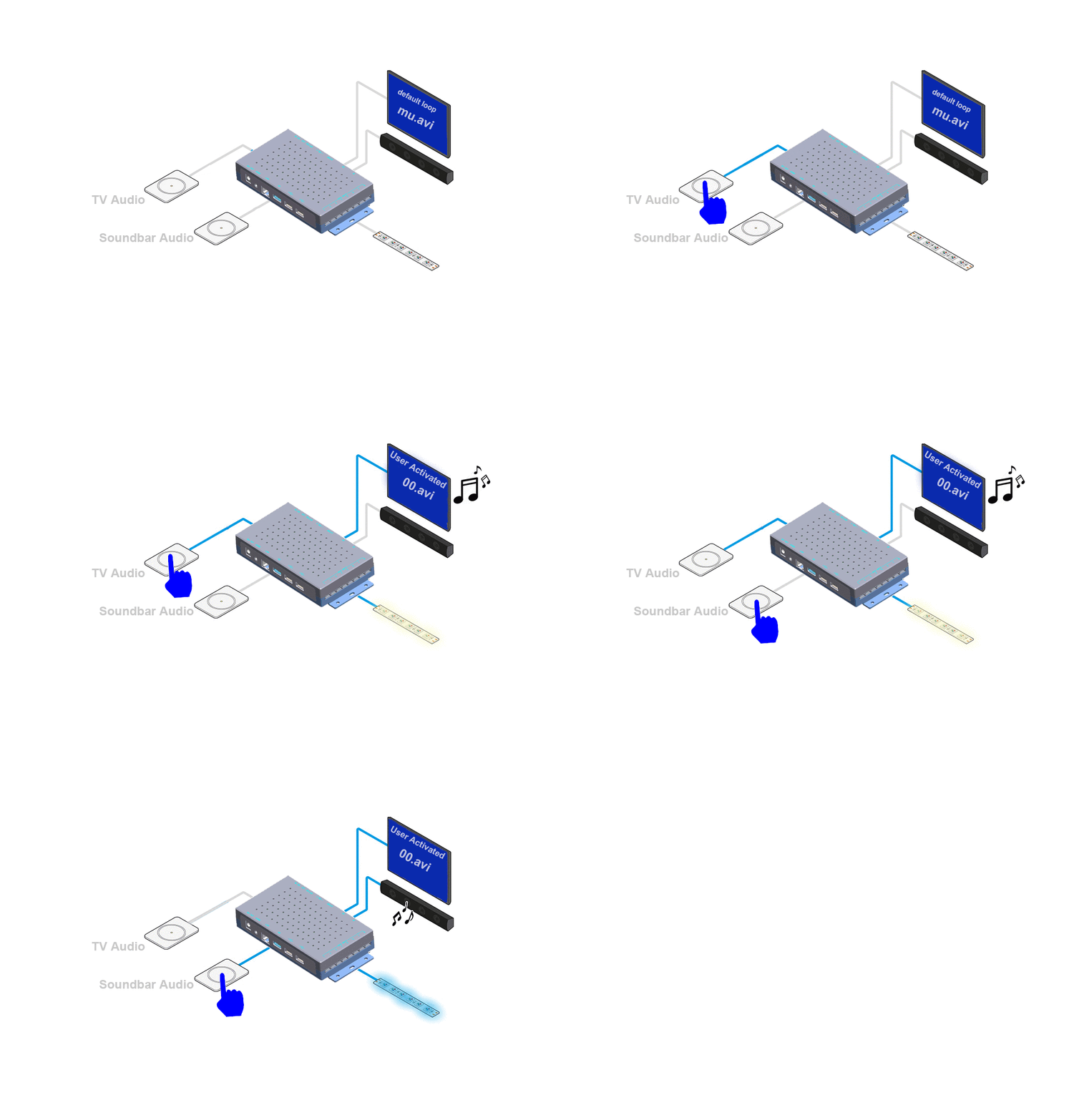
The System Uses Push Buttons And 4K LCD TV To Let Shoppers Compare The Sound Quality Of TV & Soundbar, The Sound Bar Demonstrator Auto Powers Up To A Default Loop Video And Switches  Into An Attraction Video Upon User Activation On Push Buttons, The Audio Will Be Toggled Between LCD TV & Sound Bar Without Interruption. LED Lighting Is Corresponded With Music Switch During Retail Demonstration.

Sound Bar Retail Demonstration Application

The Components List Of This Sound Bar Retail Demonstration Station:

>>Sound Bar Demonstrator 1080P Version or 4K Version;

>>LCD TV (HDMI-in Screen ) ;

>>12V RGB LED Strip ; 

>>Sound Bar;

>> Push Buttons ;

Retail User Element Variations:

Depending On The Specific User Scenario, User Interface May Be Modified Project To Project, The Quantity Of Demo Sound Bar May Be 1 to 8; We Can Customize The Software To Support All The User Interface Elements Including But Not Limited To:

>>Push Button;

>>Capacitive Touch Pad /Touch Buttons; 

>> Touchscreen Android Or Non-Android ;

>>Motion Sensor ( 1pc or 2 pcs together );

>>Barcode Reader;

>> RFID Reader ;

>>Personal Audio Device Line-in ;

>>Magnet / Hall Sensor;

Interactive Retail Solution Communicating With Demonstration Items Via Serial Commands

Interactive Retail Solution Communicating With Demonstration Items Via Serial Commands

If Clients Have Built Their Units Into “Retail Mode” Or They Made Some Retail Demonstration Version Units, We Need To Make Our Demonstration Solution Communicating With Their Units, Leveraging The Natural & True Quality As Well As Performance Of The Retail Version Units.

Supposing A Multiroom Speaker Situation, Clients Made Retail Version Speakers, With Serial Port In Form Of 3.5mm Port To Interact With Our Retail Interactive Demonstrators, Then We Re-Engineer Our Media Player App & Event Triggering Commands To Get It Aligned With Clients’ Retail Version Items. No Project Is Too Small Or Too Complicated, As We Already Modularized Our System From The Beginning, And We Are Able To Quickly Response To Client’s Needs.

For The Above Animation, Please Note That The Speaker Has A Built-in Media Player With A Preset Playlist,  While In 1#,2#, 3# Button Mode, It Plays Its Own Music Tracks, And User Operates On The Natural Buttons On The Demonstration Speakers, The Demonstration Video Will Be Playing On The Screen, Don’t Make Them Mixed, Video And Audio Here , Are Totally Isolated From Different Systems.

To Learn More Details About This Creative Retail Solution, Please Download The Specification Here.

Retail Audio POP Case Study: Headphone & Speaker Demonstration Bench for Panasonic

headphone-speaker-demonstration-system-configuration

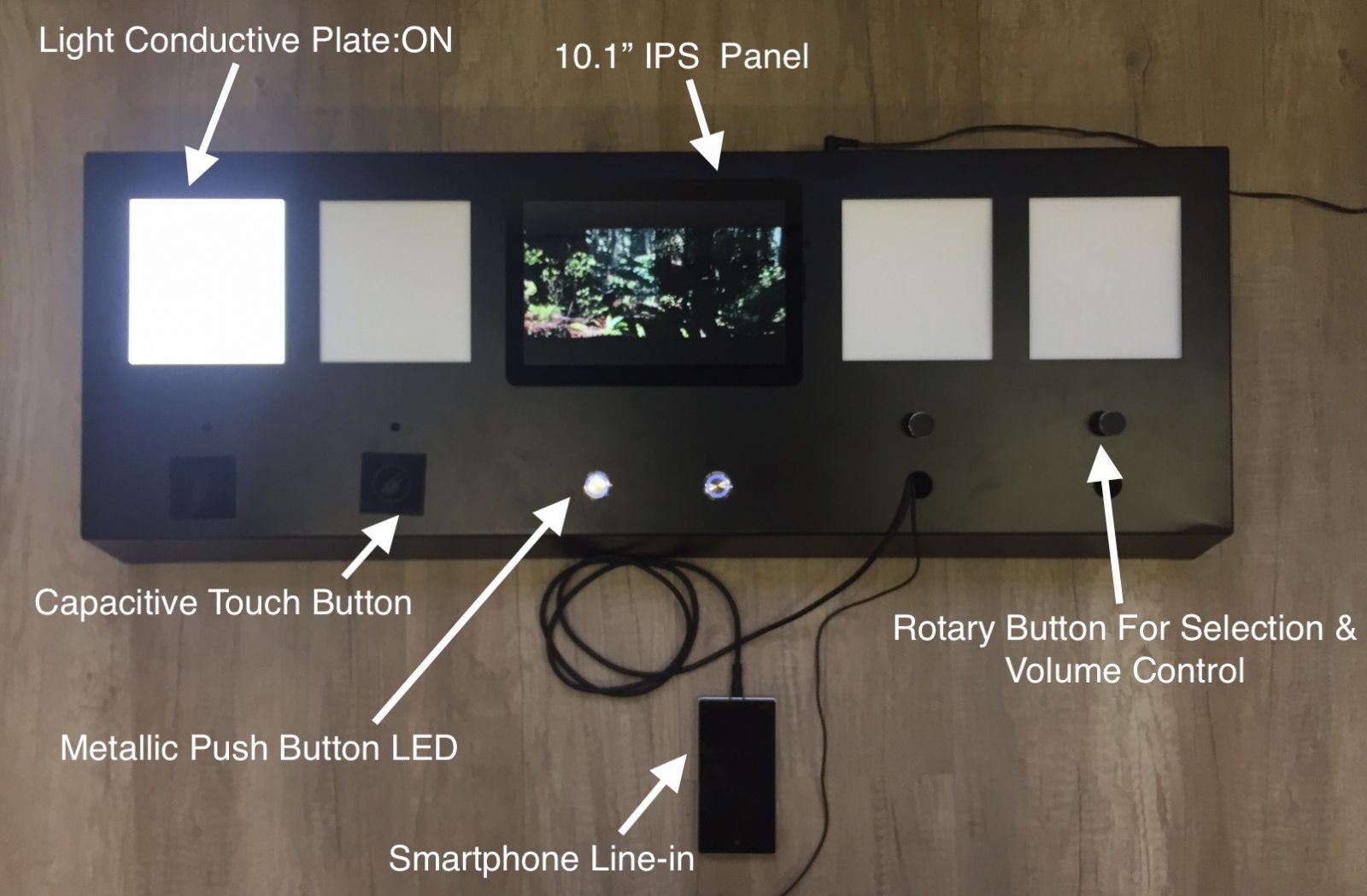
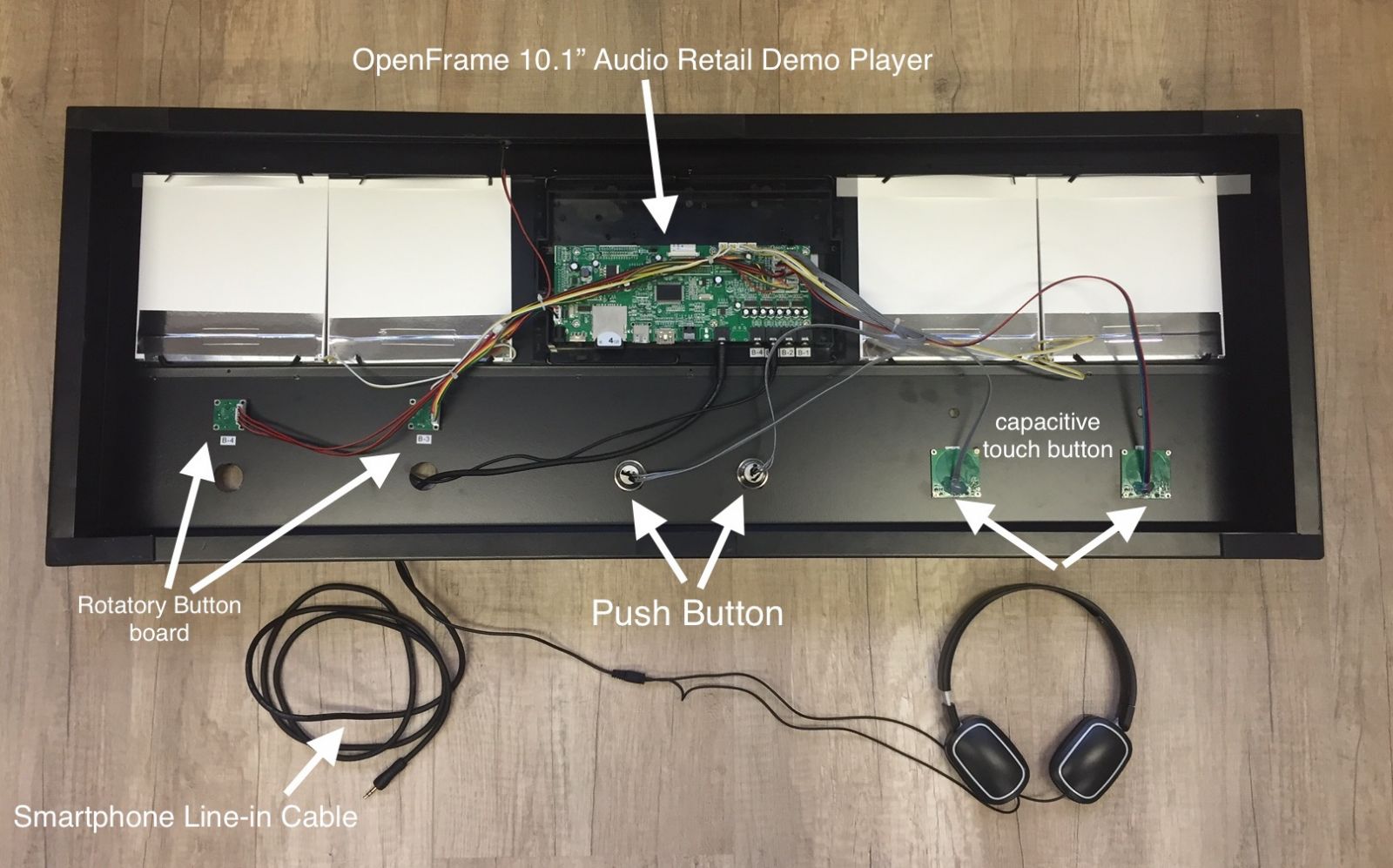
The retail fixture is made of CNC (Computer Numerical Control) machine from flat metal sheet adding spray painting to customize color. The user interfaces include LCD panel, light conductive plate, buttons and line-in cable. 3 button types are available, capacitive touch button( with easy user engagement ),  rotary button, LED illuminated push button.

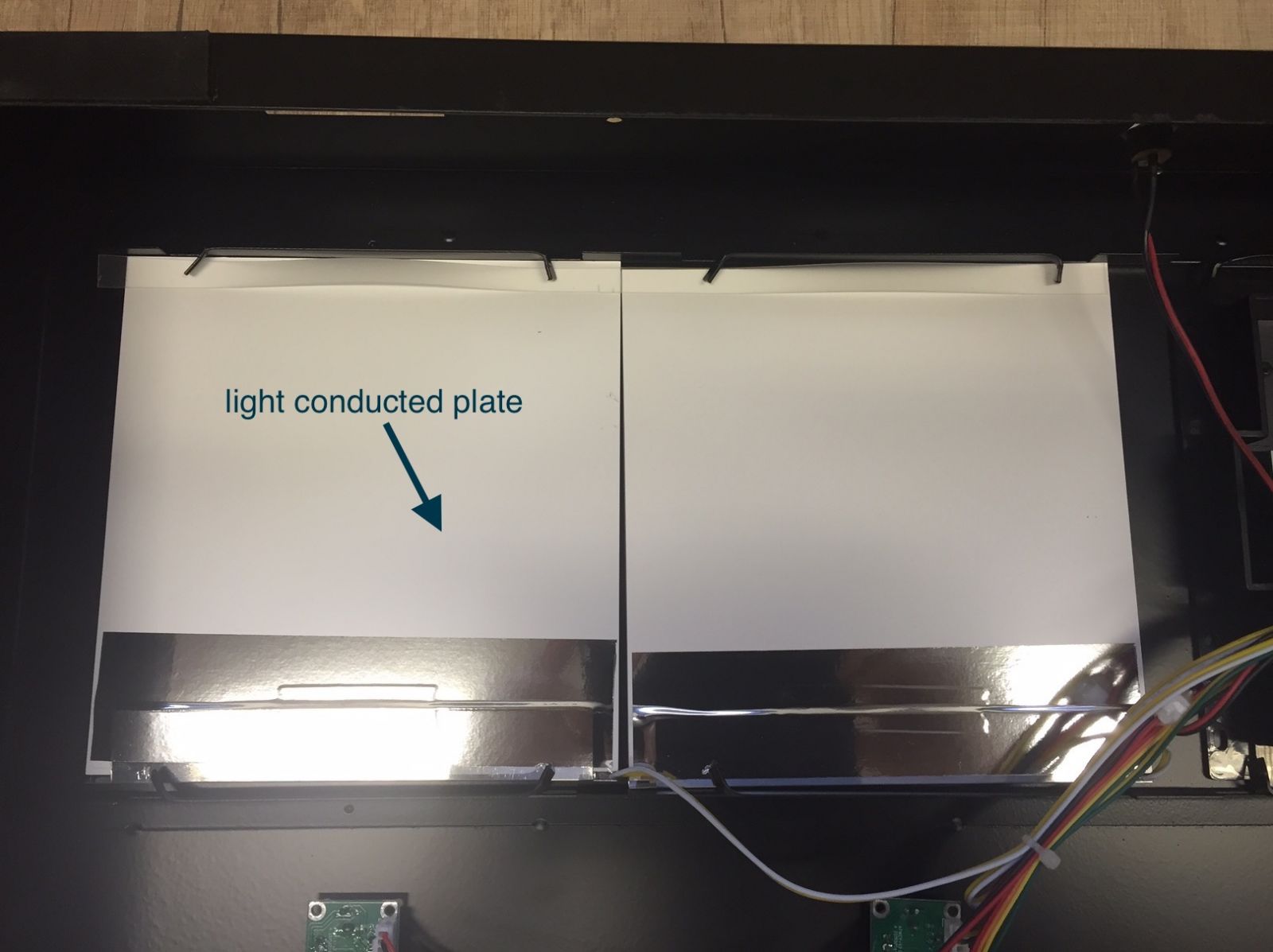
light-conducted-plate-in-demonstration-bench

The light conductive plate is made by an acrylic plate with laser-made pitch matrix to spread the light from LED strips at side to the whole plate eventually. Power supply is from power port on mother board.

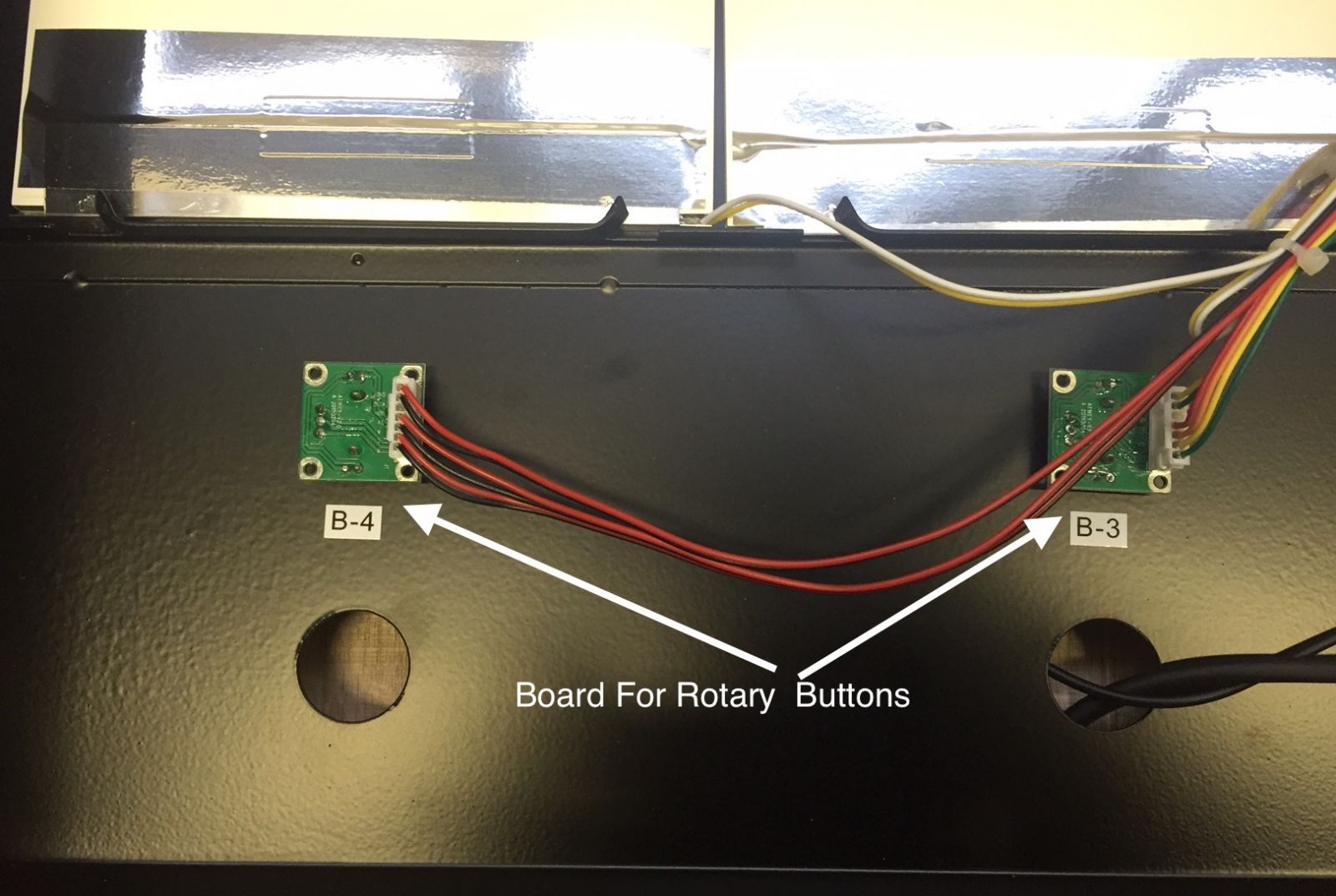
board-for-rotary-buttons-on-audio-demonstration-bench

Rotary buttons are used to adjust volume in a more natural way, and it is optional to have rotary buttons with “push for selection” function for track or output channel switch.

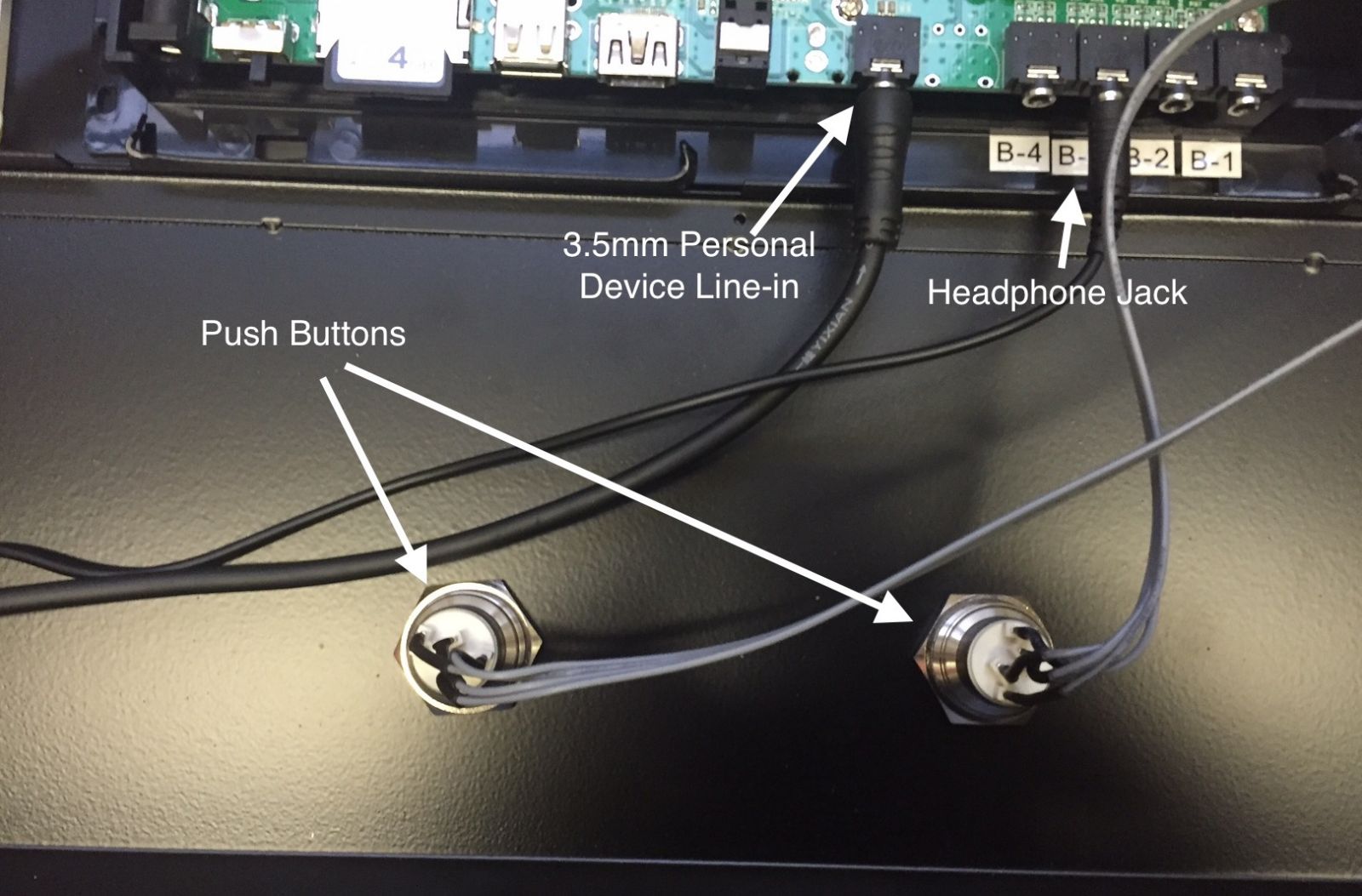
personal-audio-device-line-in

The headphone & speaker demonstration gets personal, it supports users’ personal audio device line-in to listen to their own favourite songs for easy comparison.

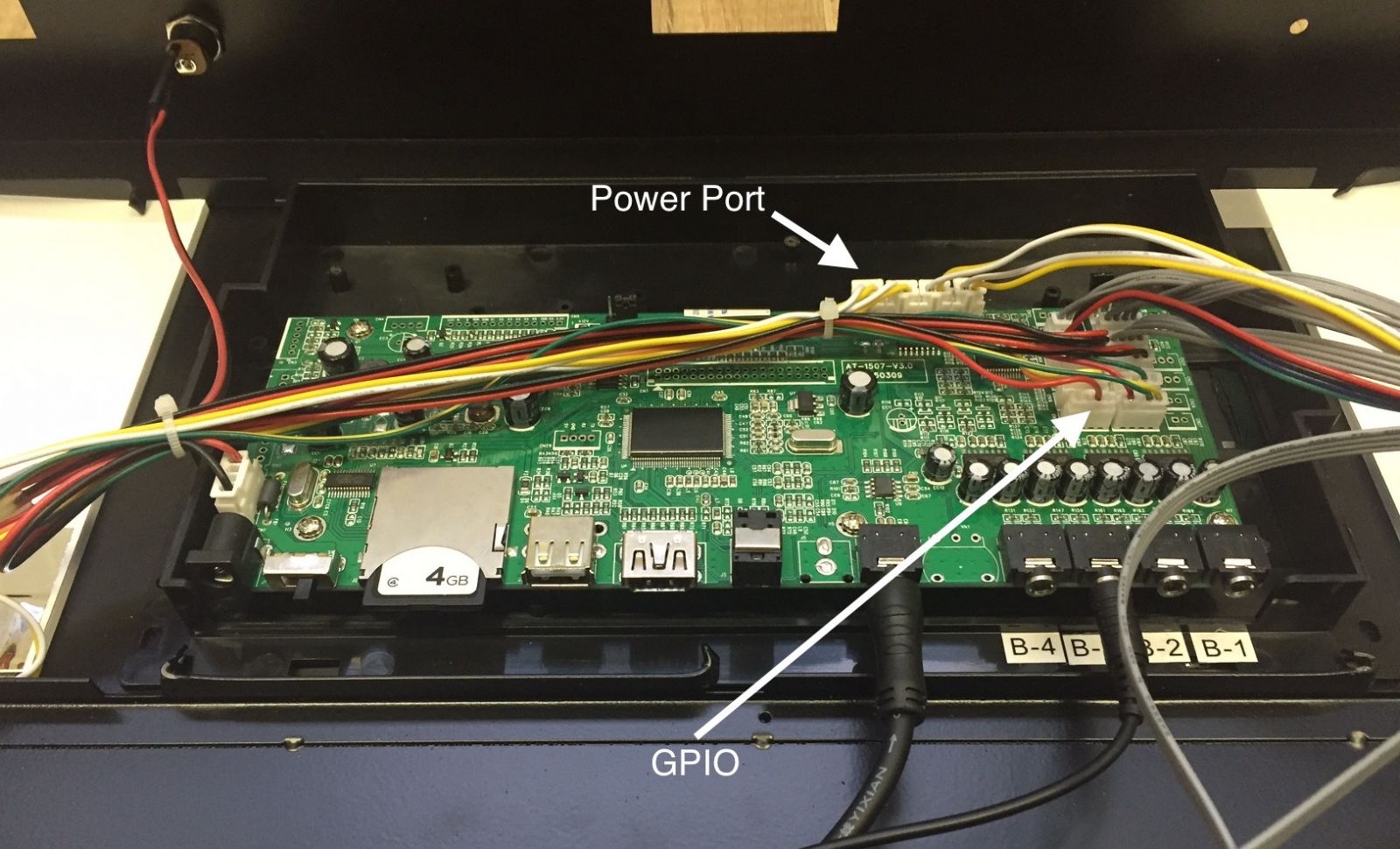
GPIO-port-power-port

GPIO port for button controls and power port for lighting power supply.

retail-audio-demo-open-frame

The inside view of implementation diagram

Custom Solutions

AOK Displays Custom Solutions

As a product strategy to help our customers differentiate themselves and stand out in the market, We keep developing custom digital signage solutions. During the process, we deliver value using our imagination to work beyond existing ideas, rules and produres. But the first of the most important is to listen to our customer’s input.

Proof-of-concept Prototyping

Taken advantage of our experience to design the product customers want. AOK Displays offers a wide range of customization options, such as:
  • Different screen sizes and  hardware configurations
  • Custom finishes;
  • Private labeling & Packaging;
  • Custom tooling /enclosures;
  • Sealing and shielding;
  • Special cabling & Power solution;
  • In-house prototyping;
  • Proof-of-concept models;
  • Compliance engineering;
  • Global Safety Certifications: UL, CSA, FCC, CE, CTICK, VDE, and TUV;
 Custom tooling


Android Digital Signage Platform

We gain our knowledge & expertise in networked digital signage from the painstaking experience in microcontrollers networked signage era before ARM & Android took the lead.


Our Android Digital Signage Platform With Web-browser based CMS is cloud-based, scalable to any demanded digital signage data transfer requirements. It enables customers to manage the connected digital signage displays remotely, from anywhere connected in the world, it supports:


1). User management with different levels of authorities, e.g. device manager, company manager;

2). Digital signage media content management, playlist & schedule management;

3). Publishing, Logging, Engagement Statistics;

networked digital signage maker


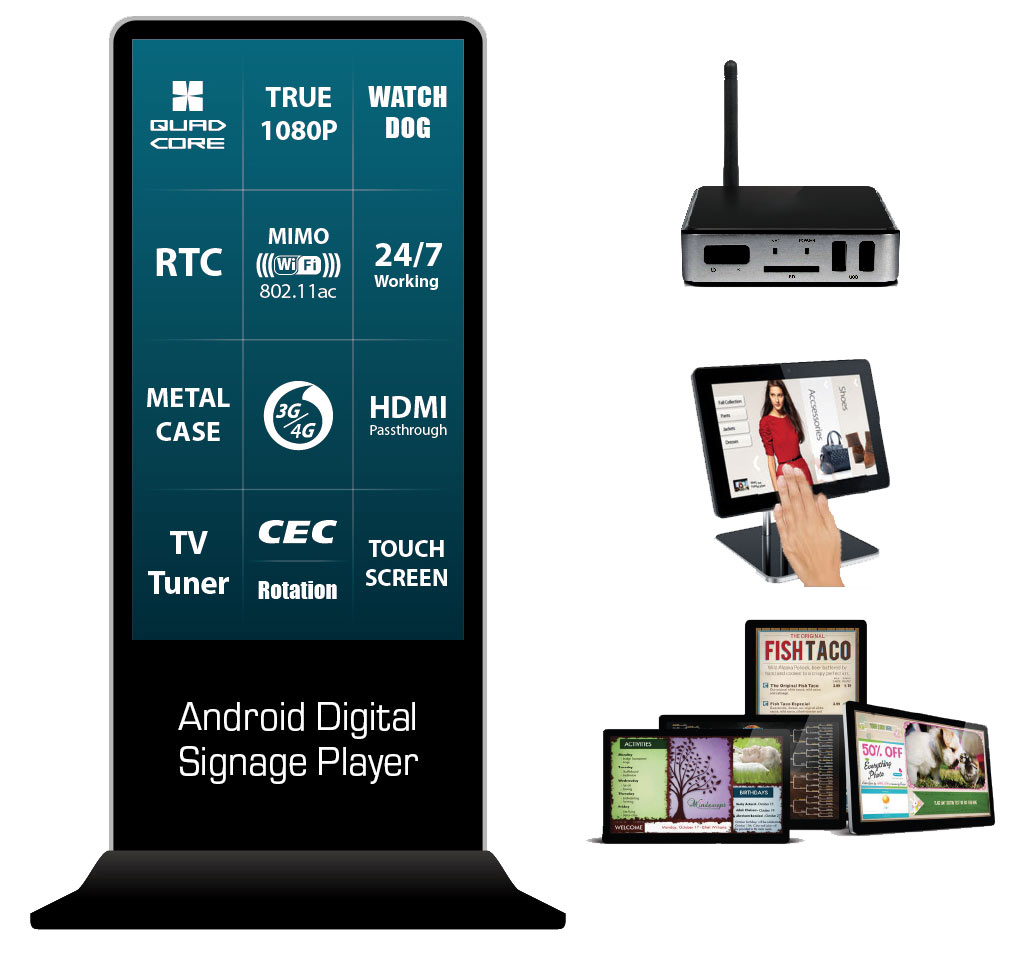
No matter what you need is for in-store digital menu boards from a chain-store restaurant with location-based playlist & schedule, a nationwide car dealer showroom’s catalogue totem with event-driven promotions, we have prepared you the ready networked digital signage solution with diverse hardware options as the following: Set-top box connecting with LCD TV with HDMI port, Retail tablet, Digital Menu board as well as the giant totem.

Android Digital Signage in diverse options

RFID Tag As User Interface Element In Retail Advertising

RFID Tag As User Interface Element In Retail Advertising


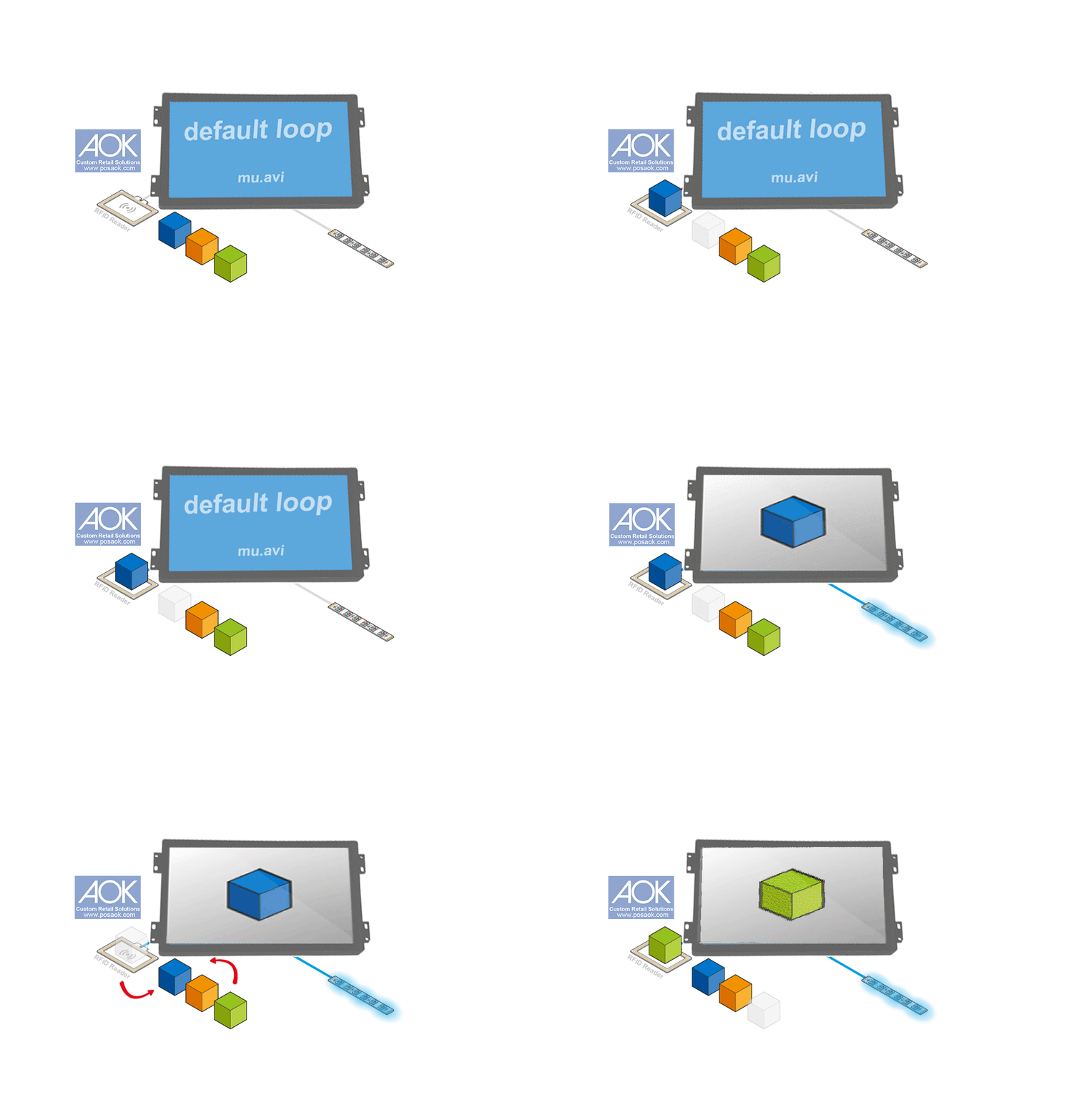
RFID Sounds A Bit Complicated, But We Make Them Simplified. Write RFID Tag Codes With Our RFID Writer & Reader Combo, As Easy As A Hand-flip. Then Make The Preloaded Video Names Matching The Tag Codes.

Learn How To Use Our RFID Writer & Reader Combo in 2 minutes (download RFID Writer Instruction Manual ).


Generally, There Are Two Types Of User Activation For RFID Powered Retail Screens:


  • Pick-Up & Learn

The Shoppers Pick UP One Of The Items On Retail Demonstration RFID Reader Pad, Then The Retail Demonstrator Is Activated With Corresponded Video ( Optional LED Lighting Change ).

RFID Retail Screen Application


  • Put-Down & Learn

The Shoppers Put Some Retail Items With RFID Tags, Away From Retail Demonstration RFID Reader Pad,  Onto RFID Reader Pad, Then The Retail Demonstrator Is Activated With Corresponded Video ( Optional LED Lighting Change ).

RFID Retail Screen Put Item Down