What extra features can your custom retail solution support ?

Custom retail solutions means custom building retail display with video, audio, lighting via integrating user elements, sensors, with matched power management & content tool support.


  • User elements

Retail user elements include but not limited to push buttons, rotary buttons,  capacitive buttons, membrane button pad, lighting strip, LED guided pad.


  • Interactive sensors


Including but not limited to Motion sensor, proximity sensor, hall sensor, lift sensor, etc, technically, any sensor that can be controlled via GPIO is OK for us.


  • Power Management


Power Management means reliable and secured power supply for retail displays, it is not only about AC adapters with UL approval, but also about isolated & linear DC power supply for audio performance, POE power over ethernet, Battery low power, and power distribution to all the devices in a display.


  • Unified software architecture


How do you manage so many peripherals to work with different hardware platforms ?


We have a unified software architecture with universal API crossing the platforms, and we have proprietary player apps in different hardware platforms ,which can call & manage the peripherals in the same way. It is a bit similar to Apple with its own OS.

It is super tiny but effective, for custom projects, we only need to provide some micro-engineering support.


  • Content Authoring


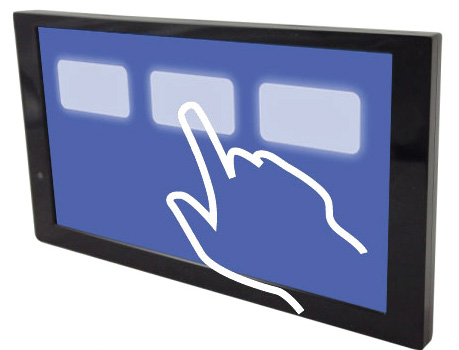
We also have a content authoring tool called Tpanel author, it is developed from a power point alike drag & drop touchscreen profiler,  let clients assembly their own contents without any coding skill. Anyone who can make power point can use this tool easily. It gives you the full set of parameters and value ranges for play control actions, as well as peripheral identifier & action syntax. For example, play, pause, next, return, time-out, loop, customer audio line-in, LED lighting on/off and patterns, audio mute. on. off. switching channels, HDMI CEC control mode, etc. Thus, customers can provide local software support via their own.

Here is a video presentation for our custom retail solution & extra features available:


Interesting ?  please get more details about the user elements mentioned above from the following link:

custom retail solution accessories


What features and functions do you provide with RFID retail advertising solution?

Key Information you need to know about RFID retail advertising solution

The conventional user elements for retail advertising are push buttons and motion sensor, while LED flashing to invite shopper for engagement, research shows that most of the informed shoppers have some level of objections for these kind of user elements.


A really successful RFID retail solution consists the following components:

  • The retail player console
  • RFID reader under the shelf
  • RFID tags sticked on the retail item

Also, there are some other supportive retail elements like light guide pad, LED lighting.


Our retail players come with 5 different forms:

  1. Openframe videoscreen,
  2. Framed video screen,
  3. Openframe retail tablet
  4. Framed retail tablet,
  5. 4K UHD media player.

It supports both multi-item on one reader pad as well as single item per reader mode.And it supports up to 32 different tag enabled demo items.


In order to truly empower retail integrators to provide quick and cost-effective solutions to the retail field, we have developed our RFID writer and reader combo toolkit to let end-user generate their RFID tag, then end-user could re-organize their retail advertising campaign via re-generating the matched tokens.


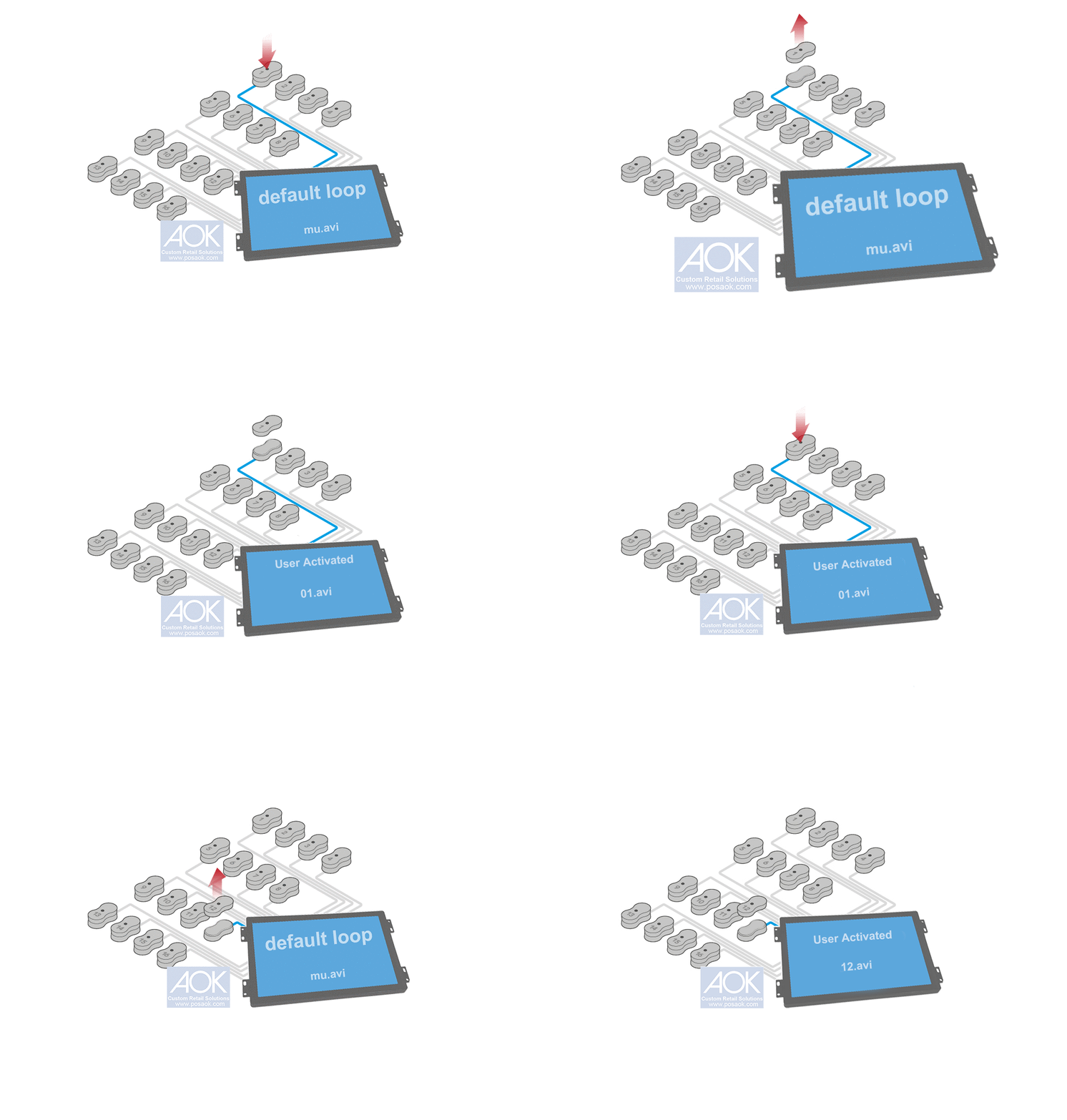
A typical RFID lift-and-learn user scenario will be like the following animation:


RFID Pickup lift and learn animation

Interesting ?  please get more details about our RFID retail advertising solution from the following link:

RFID retail advertising solution


Common & key questions about low power battery driven retail screens?

Here are some frequently asked questions about our low power battery driven retail screens

  • How long does the user activation require from user action to video playing ?

Within 2 seconds, to be precisely 1.3 seconds, this is one unique feature than no others.

The time taken to change from low power sleep to content playback is critical for battery powered solutions as a customer approaching or touching the display will bring it to life. Low-Power Play enables displays to boot up instantly(within less than 2 seconds) every time they are activated , delivering your message immediately and effectively. Many displays on the market take several seconds to power on leaving customers seeing the ®”power up” screen and most likely moving on to a more compelling promotion.


  • What Are The Available Screen Sizes For The Battery Driven Display Solution ?

4.3″/5″/6.2″ /7″ /10.1″ /15.6″/18.5″ / 24″


  • What Kind Of Video Triggers or power managers Do You Use ?

Battery Driven Retail Video Player Is Designed To Address The Installation Scenario, In Which AC Power Supply Is Not Available Or Not Convenient.  End-user Would Require A Maintainence-free Solution, So A Video Trigger Must In Place To Manage When To Play As Well As When To Keep Standby.

There Are Two Major Video Triggers: Motion Sensor (PIR ), Push Button ( LED illuminated ), other triggers also available;


  • How Long Will Your Solution Work In The Field Before Replacing Battery Pack ?

It Would Depend On The Battery Pack As Well As The Screen Size & Video Clip Length. Normally, For The Standard 4.3inch With Motion Sensor, A Battery Pack Of 8 Pcs Of D Batteries Would Support 4800 Times Of 20 Seconds Video Playback. Assuming 7 Times Per Hour, It Means 90 Days.


  • Does this battery driven video player support AC mode as well ?

Yes, it does. It has a built-in switch to change between AC adapter mode and battery mode.


  • What’s the file structure of the unit ?

For battery mode, it has only 1 single file to be preloaded to respond with the motion sensor triggering, it is 05.avi (xvid encoder, limited to 720Á576 pixels ). For battery mode, it has a default loop video ( mu.avi ) and a user activated video ( 05.avi ) if there is a motion sensor.


  • Does this battery driven solution support AC power & Battery power at the same time ? only taking battery pack as UPS (uninterruptible power supply )?

That would require a small circuit to manage the power route between AC adapter power and battery power, and we have this solution.


  • Can we use one single power inlet for both AC adapter and battery pack for easier maintainence if a store worker needs to change the power source ?

Yes, then we use only battery driven mode.


  • How can we do if we don’t want to change the battery pack for the product life-circle and we connect all the battery packs in place ?

Good idea, suppose one 8xD battery pack can support only 3 months’ user activated playback, then we can connect 4 packs (4¡Á8=32pcs of D batteries ) in parallel connection.


  • What’ s the discharging voltage range of the unit actually ?

In order to make full use of the battery capacity, we make the unit workable with a wide voltage range, from 7.5V to 18V.


  • Does your solution also wake up when people leave out the active area ?

No,  a delay interval could be set in the firmware which is specified to keep the standby-sleep for the preset interval after each activation, then for human motion of people leaving out the active area, activation will be disabled. Then your customers get the message you want to deliver while Low-Power Play controls content playback and battery usage.


  • How Are The Batteries Housed ? and How can I know the battery remaining capacity and decide when to replace the battery pack ?

Generally, the batteries are housed into a battery holder, but in most cases, the seasoned customers would just use blister wrapped packing with power cable leads for directly installation and easy transportation. And there are two ways to get battery capacity info. One is to check on-screen message with special number to refer the battery capacities, the other is to press a battery level button and check the LED indicator on our proprietary battery holder.


What should you know before ordering retail audio demonstration players ?

AOK Retail engineering creates compelling audio experience in retail display and helps brands demonstrate product audio capabilities, providing aids in comparison shopping.


Here are some frequently asked questions about our audio retail solutions.


  1. What audio file formats do your solution support ?

3 types, mp3, w.a.v, F.L.A.C

  1. What kind of high resolutions are supported ?

Sampling size of 192KHz at 24-bit.

  1. What solution form factors do you provide?

Mainly two types, audio only solution and audio solution with video support. And for audio only ones, we have pure audio board, boxed audio-only player; For audio solution with video, we have audio player video screen, tablet audio player, boxed audio player with 4K & HDMI. In addition, we also have audio player with serial command to work with 3rd party device.

  1. what typical audio products do your audio solution support?

4 types, headphones & Earphones, Portable Speakers, Sound bar, High Power Speaker.

  1. Let’s dig into headphone & portable speaker first, how do you handle such a great variety of different audio interface, for headphones, we know there are 3.5mm, type-C, and USB Type-A ?

We have existing solutions to direct output audio via 3.5mm & USB type-A, for type-C, we have adapter cable either for type-C digital or for type-C analogue. And our 3.5mm analogue to USB digital converter can support Toslink interface as well.

  1. For USB powered demo speakers, how do you make sure the power is stable and there is no power related noise ?

In this scenario, we need to use DC linear power distributor instead of common adapted DC power to provide constant & stable power to the demo speakers.

  1. When you provide USB power to the demo items, How do you handle the demo items with fast-charging capability when 5V 1A may be not sufficient ?

We have custom built, special USB cable with fast-charging detector, it will provide the matched power when detected.

  1. I noted a special feature of your solution, to let users use their own device to line-in their own music, do you have Bluetooth customer line-in solution?

Yes, we have wired one with type-C, Lightning and 3.5mm to type C line-in cable, and the wireless, Bluetooth one.

  1. Does your system provide retail LED lighting integration ?

Yes, all our retail solutions can support LED lighting control.

  1. Can you tell us something about your sound bar retail solution ?

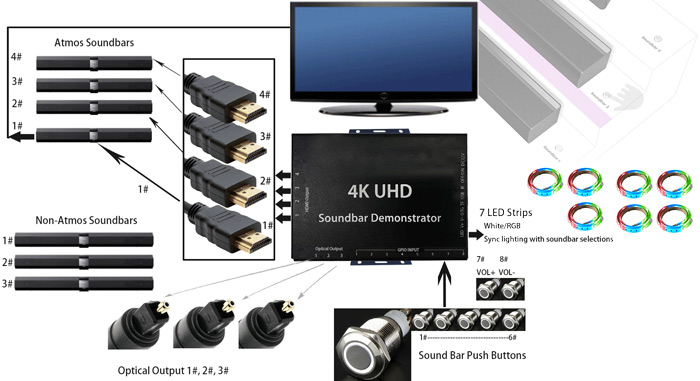
Well, we have mainly 4 types of retail solutions for sound bar demo, audio only sound bar player, sound bar audio player with HDMI, sound bar audio player with Atmos support, soundbar player all-in-one video screen. It almost covers 90% of the typical sound bar retail demonstrations.

  1. Do you also provide demo solution for high power speakers like car speakers ?

Yes, we have total solution for car speaker demonstration, we have our own power amplifier and speaker relay switch to work with our existing 24-bit audio players, it supports up to 100W high power speakers.

How does your Dolby Atmos sound bar audio demo player work ?

Dolby Atmos sound bar audio demo

It is a bit technical but still quite simple.

However, our sound bar audio player can NOT decode Dolby Atmos audio at all, then how does it work to drive and deliver Atmos immersive audio experience?

It doesn’t need built-in Atmos decoder, as all the branded 4K LCD TV as well as the Atmos sound bars have that Atmos decoder. Why don’t we just take use of their Atmos decoder ?

With HDMI CEC control, we send audio RAW data to the sound bar or 4K LCD TV speakers, with CEC control, sound on & off as well as volume control can be managed over TV remote control codes, from our sound bar audio player.

How do we connect the devices together to make it work ?

Quite simple.

1st, connect No.1 HDMI output port of our sound bar audio player with a Dolby Atmos sound bar to its HDMI input port, and line-out to 4K LCD TV via HDMI port .

2nd, connect other sound bars to the other HDMI ports on our sound bar audio player.

Now, when you press push button selector to toggle the sound between LCD TV and sound bar, you could experience and compare the Dolby Atmos effect from different sound bars.

The following video will help you understand these technical details visually.


Why do retail brands prefer Open Frame Media Players

Additional Feautures for our Openframe Retail Screens with a Multi-Functional board.

Retail field is complicated, the advertising screen needs to be secured, reliable and friendly to shopping, maintenance as well as installation.

Most of the standard, framed media player can not meet the above mentioned requirements unless retail integration companies try to customize their store fixtures. When they think about customizing store fixtures to make the retail screen look elegant, they prefer open frame retail screens as these media players offer more flexibility and options when needed.

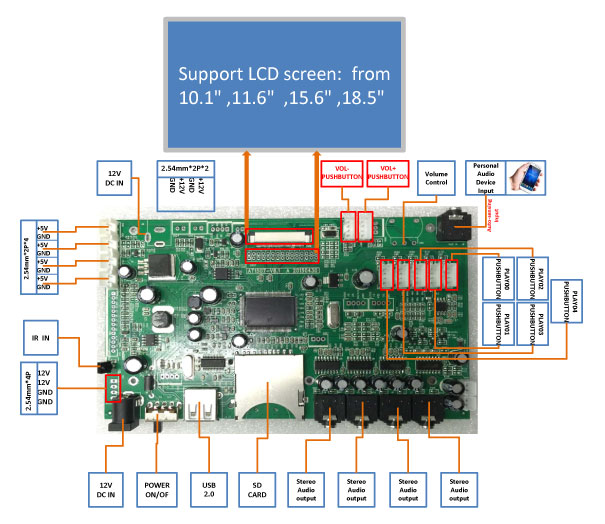
Multi-Functional Boards For Open Frame Media Players