Categories
News Releases

6-Channel RGBW / Retail Lighting LED Controller Hub

Now available in both UART and USB HID versions


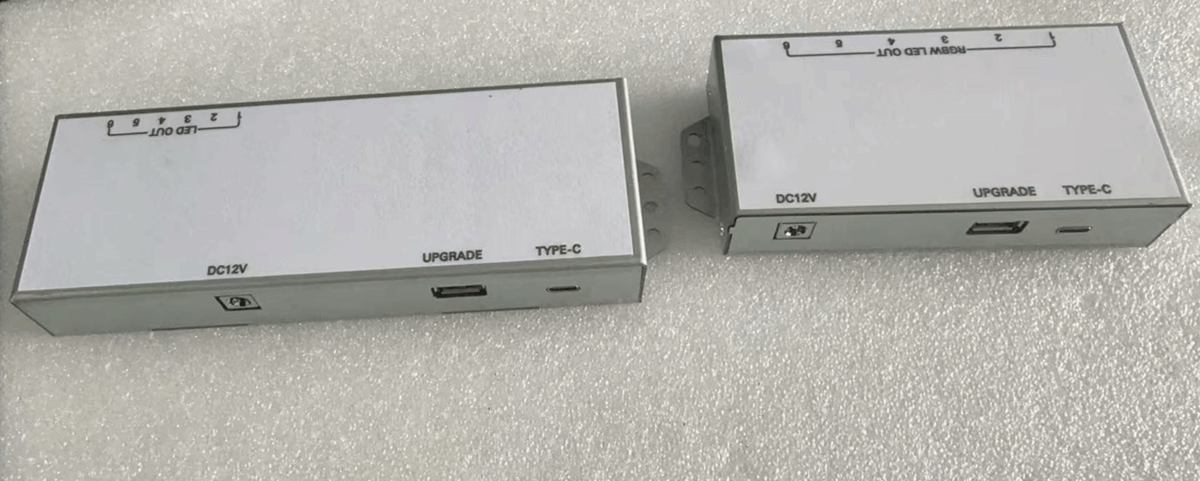
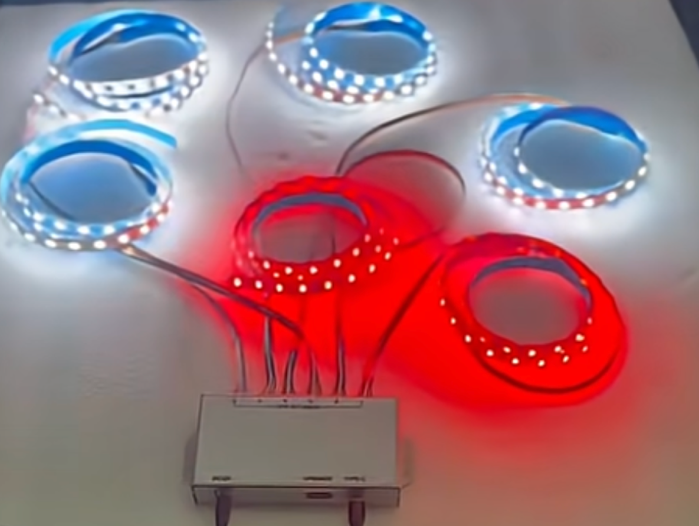
RGBW LED lighting controller

Designed for retail LCD display environments — digital shelf-edge signage, interactive kiosks, video wall accents, and in-store merchandising — this compact metal hub provides six independent channels to sync dynamic lighting with the whole-line of our retail media players, video screens, and touchscreen tablets, supports OS Android, Linux, Windows as well as BrightSign ecosystem hardware & content platform to create immersive experiences.

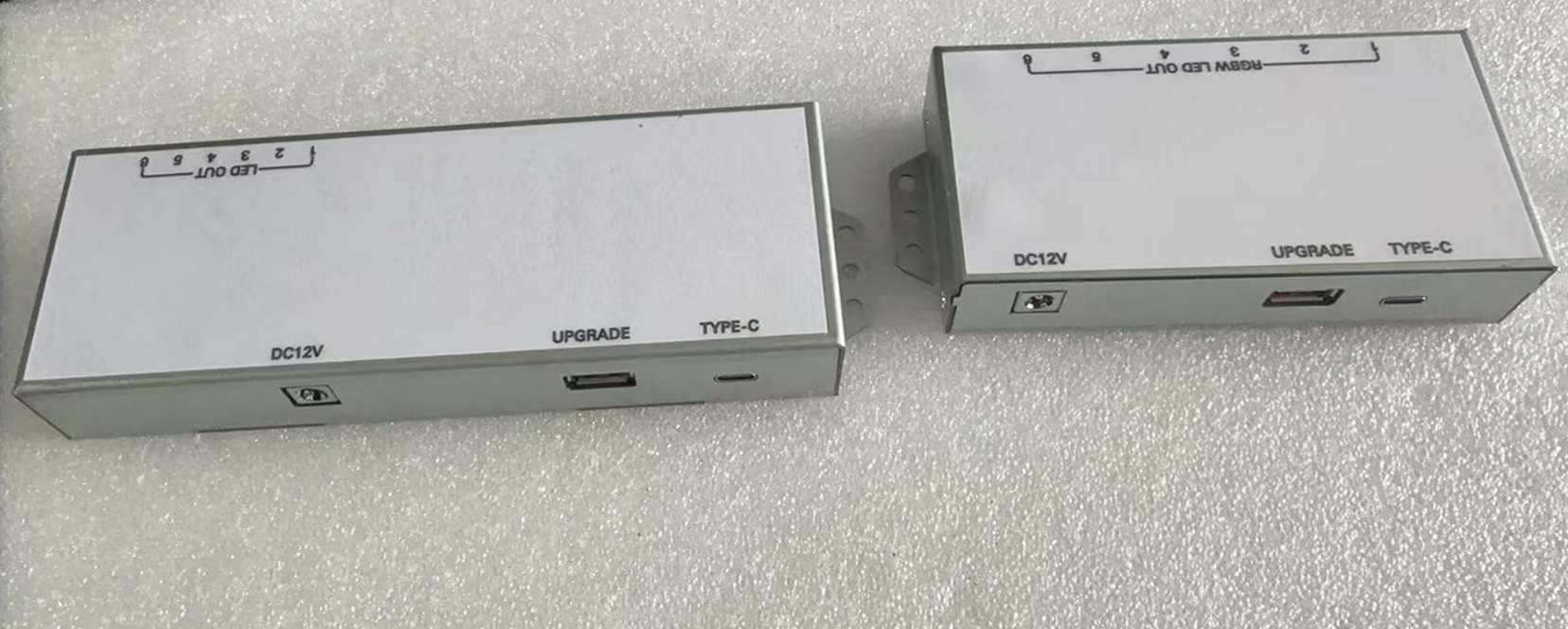
UART LED lighting

Key Features

1. 6 independent outputs:

RGBW: 6 × 4-channel zones (full color + tunable white);

Mono: 6 × single-channel.

2.Tool-free Molex spring-clamp terminals for fast, secure wiring.

3.DC 12 V barrel input.

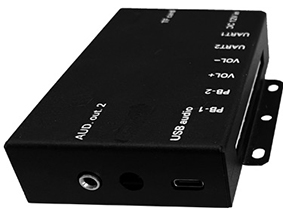
4.Front USB-C for firmware upgrades/diagnostics.

5.Control options:

UART — serial protocol for BrightSign, Android, Linux, Windows, embedded systems, microcontrollers ;

USB HID — plug-and-play (no drivers), works natively with USB host ports.

6.All-metal housing with mounting ears — durable and EMI-resistant.

7.Full protocol docs included for both interfaces.

Advantages

Replaces six separate controllers → fewer wires, power supplies, and install time.

Rugged metal case for 24/7 retail reliability.

Flexible UART or USB HID matches standard HID device setups like a USB keyboard (serial scripting or HID events).

Field-upgradable via USB-C.

Compact size fits behind LCD bezels or in cabinets.

Real-World Benefits

Dynamic RGBW / tunable white lighting synced to our retail solutions and other main hardware with the mainstream OS Android, Windows, Linux.

Faster, cleaner installs with fewer call-backs.

Easy bridging to popular touch panel brands DMX, KNX, Crestron, custom apps via open protocol.

Built tough for high-traffic stores and showrooms.

Retail LCD Application Scenarios

Shelf-edge & perimeter accents around digital signage.

Backlit lightboxes to highlight user selection and video wall integration.

Display cabinet / showcase lighting with product demos.

Feature walls and promotional zones.

Interactive kiosk surrounds with touch-reactive effects.

Tunable-white zones for menu boards and ambience.

Quick Start Guide

1.Connect 12 V DC.

2.Snap LED wires into numbered spring terminals.

3. Power on — instant channel verification.

Available now — UART & USB HID versions, RGBW & Mono models.  

Contact us for protocol docs, samples, OEM pricing, or integration guidance.

Here is a quick demo video for this LED lighting controller →

Ready to upgrade your retail LCD lighting?  Share your channel needs, interface preference, using our own retail electronics or 3rd parties’ — Contact us for same-day quote.

Categories
News Releases

USB / UART Accessories for Interactive Retail Displays: One Board, Many Touchpoints

Interactive retail displays are rarely “one-size-fits-all.” A single rollout may require LED push buttons for product selection, RFID readers for content unlock, capacitive touch buttons or pads for premium UX, and PIR sensors for auto-wake—all while fitting strict space, wiring, and integration constraints. Our approach is simple:

Make the I/O universal

So your display system can connect to a wide range of accessories—without redesigning the entire control stack every time.

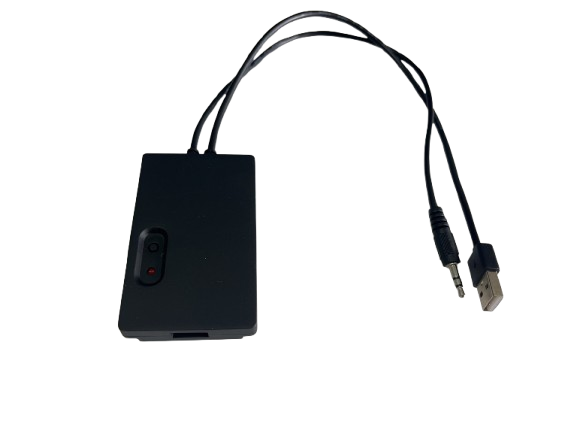
uart retail accessory

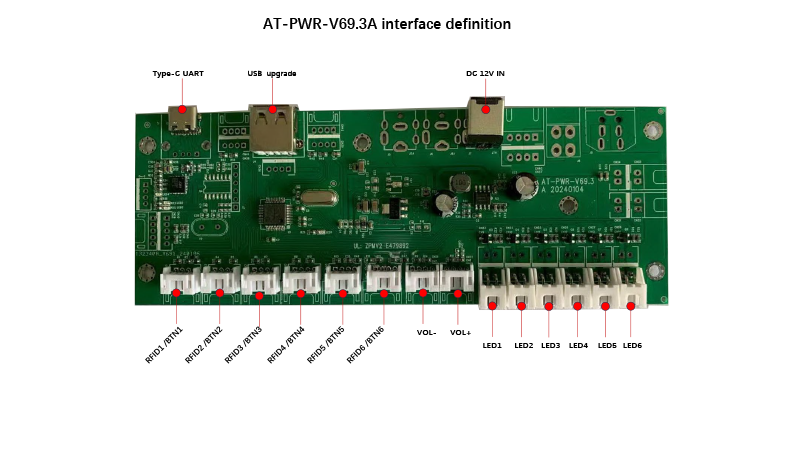
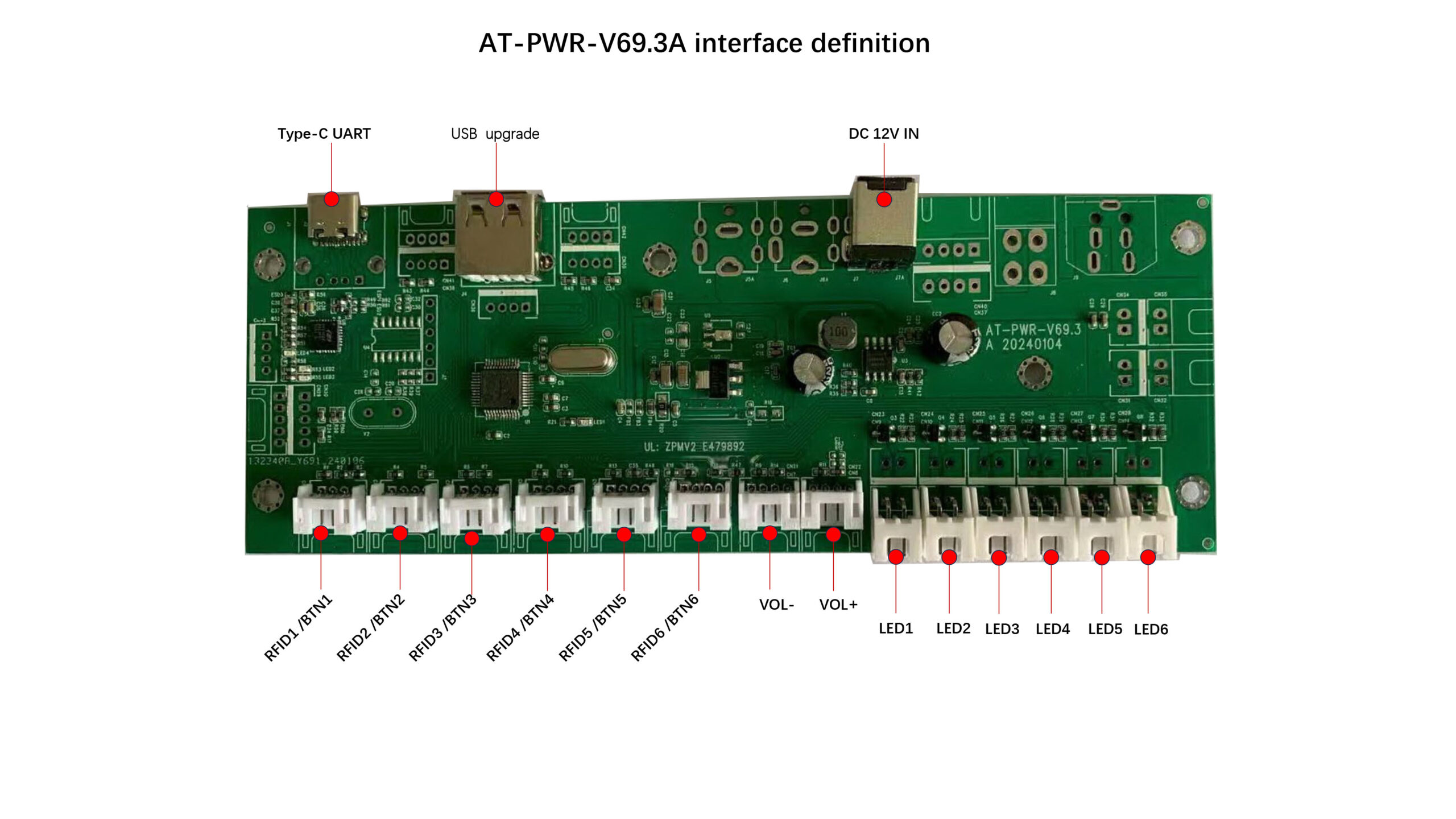
A practical example is our AT-PWR-V69.3A accessory board. It is designed as an integration hub with Type-C,UART and a dedicated USB upgrade interface, plus DC 12V input for field installations. On the I/O side, it offers multiple channels for accessory connectivity—supporting common retail triggers such as RFID/button inputs, along with dedicated outputs for LED indicators and volume control lines (VOL+/VOL-).  This architecture is intentionally modular: you can scale the number of inputs, map triggers to different actions, and keep wiring consistent across projects.

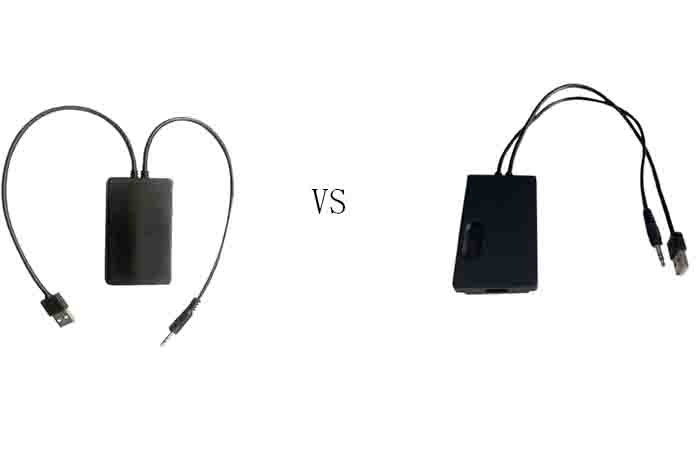
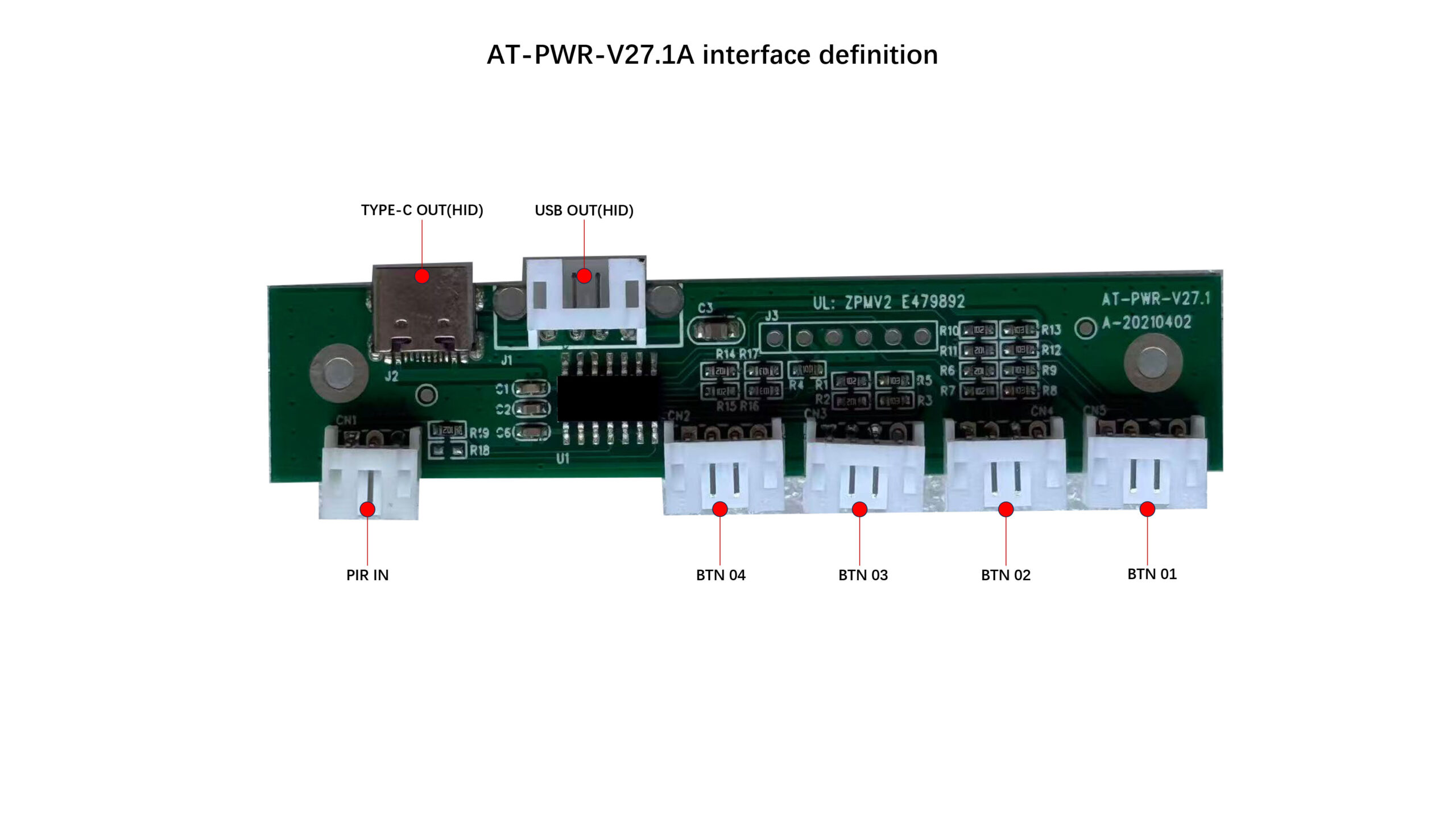
For customers who prefer plug-and-play USB, we also support USB HID-based interfaces, such as the AT-PWR-V27.1A, which provides Type-C OUT (HID) and USB OUT (HID) with ports for PIR and multiple button inputs.  HID is convenient because it’s widely compatible and often driverless. However, in real retail deployments, HID can be less responsive and less functional than UART for interactive control logic—especially when you need deterministic timing, richer bidirectional communication, custom event framing, or tighter synchronization with media playback.

That’s why we offer both paths—USB for quick integration and UART for deeper interactivity—and, more importantly, we tailor the board-level I/O to your project requirements. Whether your retail display needs simple triggers or a richer accessory ecosystem, we can adapt pinouts, port counts, connectors, firmware messaging, and mechanical constraints to fit your fixture design and installation workflow.

If you’re planning a new interactive retail display program, we’re ready to help you standardize accessory integration—so every store build is faster, cleaner, and easier to maintain.


Categories
News Releases

Why is the Typical 3 000 nit window LCD still the most matured sunlight readable window display

We were requested to provide a prototype of 5000-nit LCD window display, and this request was rejected gracefully by our R & D team, here are the reasons & considerations.


1 . Can we reach 5 000 nits on an LCD window display?


ItemTypical 3 000 nit window LCD5 000 nit LCD What changes?
Back-lightStandard high-power LEDs≈1.6–2× more LEDs or higher drive current (often Mini_x001e_LED)Power ↑ 60 – 100 % (55-65″ screen can peak at 800–1 000 W full_x001e_white)
Thermal designFans + aluminium heat-sinkForced air tunnel,heat-pipes or liquid plateInternal temperature easily >25 °C above ambient
LCD glass/panelRegular high-Tni (≈85 °C) panelUltra-high-Tni (≈110 °C) panelPricing & yield penalty
OpticsSingle_side AR coatingLow-iron glass + double AR + compensation filmMust keep net transmittance ≥ 92 %
Lifetime spec50 000 h @ 3 000 nit30 000 – 40 000 h @ 5 000 nit(faster LED ageing)Warranty often drops from 3 year to 2 year
Cost index100 % baseline180 – 220 %Mini-LED + thermal budget drive BOM sharply higher


Commercial signage products do exist in this 5000-nit class ( Our virtual bow to big names in LCD panel industry )

The extra brightness is absolutely feasible, but every aspect—power draw, cooling, panel cost, and service life—rises in tandem.


2 . What about 10 000 nits?


Sustained full-screen 10 000 nits on LCD is still a lab-demo exercise.


Heat density would exceed 1.5 kW / m²; liquid crystal, polariser and glue layers would carbonise within minutes.

Mini-LED TVssometimes advertise 10 000 nits, but that figure is peak HDR windowbrightness, not continuous full-white.

Hisense’s 110-inch “ULED X / TriChroma” panel is a recent example (10 000-nit peak, 40 000 back-light zones).

If “real” 10 000 nits is a must, the industry shifts to direct-view LED (dvLED)cabinets. Outdoor LED tiles routinely deliver 5 000–8 000 nits and can be driven higher, but pixel pitch (≥1.5 mm) limits close-up image fidelity.


3 . Why brightness gets exponentially harder


Electrical efficiency– White LEDs convert only ~30 % of input power into light; doubling luminance ≈ doubling heat.

LCD black-zone risk– Standard panels blacken around 65 – 70 °C. High-Tni versions push that to ~110 °C but are costly and scarce.

Optical ageing– UV + high temp accelerate yellowing of light-guide plates and polariser delamination; light drop-off for a 5 000 nit unit can be 35 – 40 % in three years.

Regulatory power caps– EU Ecodesign and California Title 24 already restrict signage power; >500 W units demand auto-dimming sensors and scheduler logic.


4 . Practical recommendations for a shop-front project


ScenarioSuggested solutionReasoning
Standard street window, direct sun3 000–3 500 nit LCD + double-side AR glass + ambient light sensorReadability ratio (≥8:1) is reached; higher nits give <15 % extra contrast but cost/power rise sharply.
Flagship/VIP storefront with extreme glare5 000 nit Mini-LED LCDBudget roughly doubles; demand redundant cooling and written guarantee on light depreciation.
Long-distance shop sign 3–6 mm dvLED, 5 000–8 000 nitsPixel pitch acceptable beyond 3–4 m; easier to hit >5 000 nit continuously.


5 . Conclusions


5 000 nits is commercially attainable, yet expect ≈2× cost plus stringent thermal engineering and shorter warranty.

Continuous 10 000 nits on LCD is not market-ready; only peak HDR or dvLED can hit that figure today.

Instead of chasing absolute nits, combine low-reflection glass, adaptive dimming, high-contrast content and nightly power-down to achieve visibility andmanageable total cost of ownership.

Finally, our existing models HB4300 HB7500 are still the most matured commercial display solutions featuring Ultra High Brightness Sunlight Readable LCD Window Displays with proven records.


Categories
News Releases

The comparison of soundbar with 4K LCD TV and pure audio player for Dolby Atmos

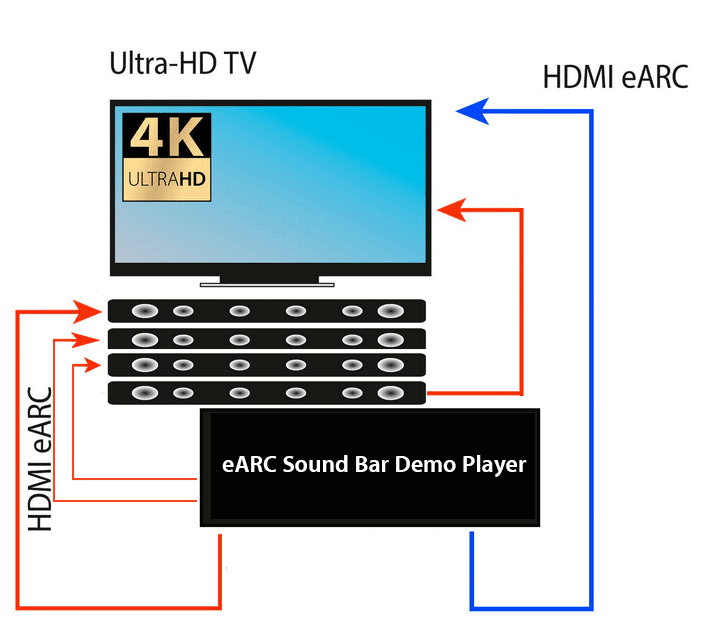
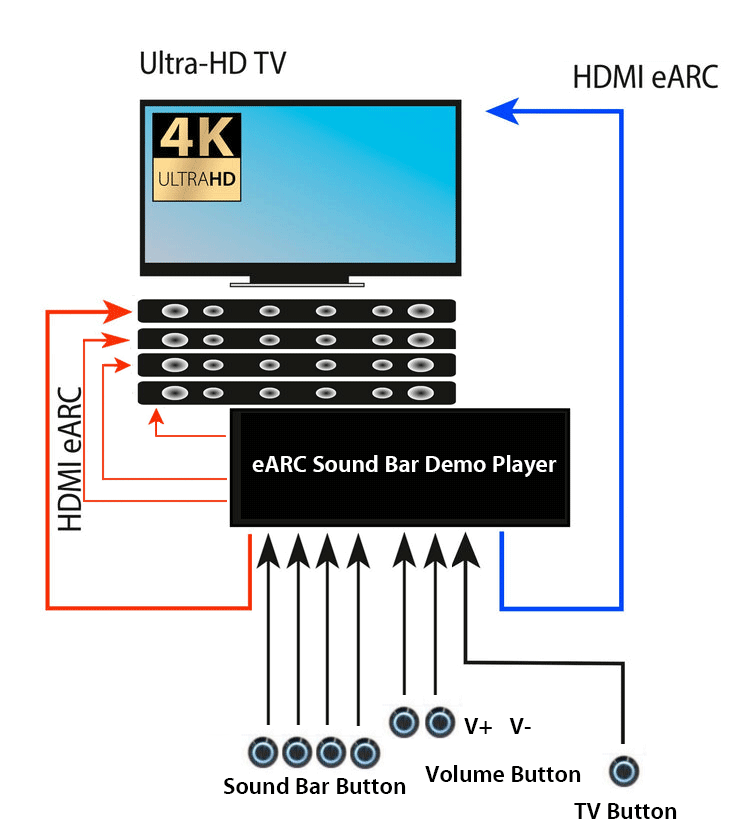
The main difference between a soundbar audio player working with a 4K LCD TV to demo Dolby Atmos audio experience and a pure audio soundbar player via eARC port working without a 4K LCD TV for showcasing Dolby Atmos audio lies in the role of the TV in the system and how the audio content is processed and delivered,. Here’s a detailed comparison:

1.Soundbar Audio Player with 4K LCD TV to Demo Dolby Atmos

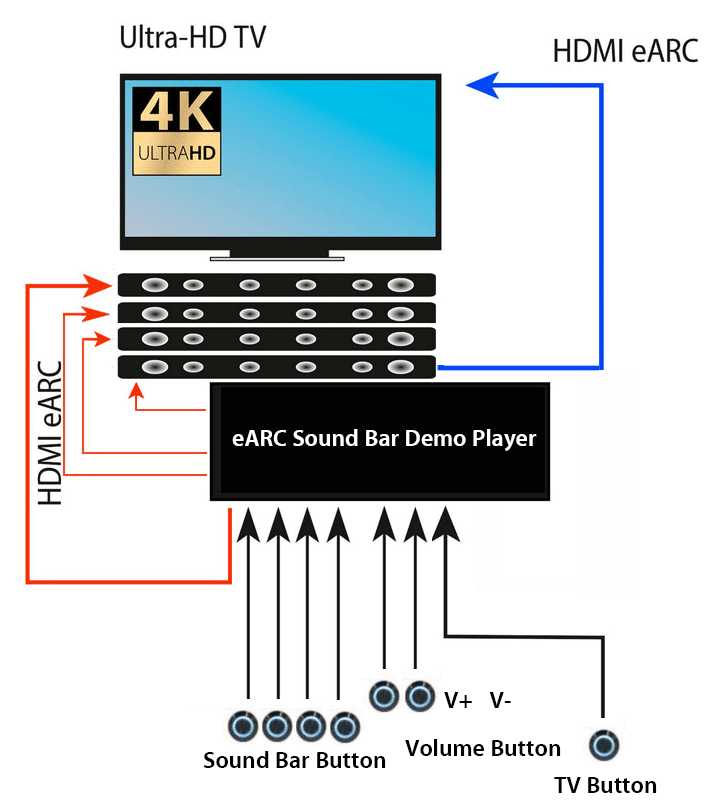
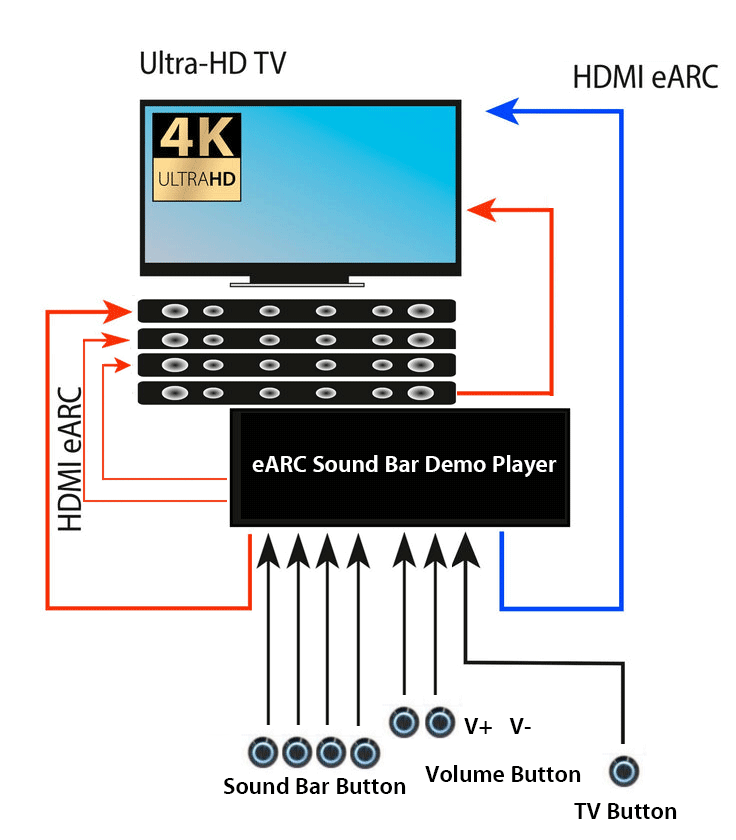
There are 3 types of system layouts based on the demo soundbars I/O ports availability.

1-1.From soundbar to TV mode.Soundbar to TV mode
• Audio Source: HDMI output from the soundbar audio player is connected to the soundbar via HDMI.
• Video Signal: The soundbar processes the Dolby Atmos audio from the HDMI input and then outputs the video signal to the TV via line-out (HDMI or other video out connections).
• TV Role: The 4K LCD TV is responsible for displaying the video, while the soundbar handles the audio processing, including decoding Dolby Atmos.

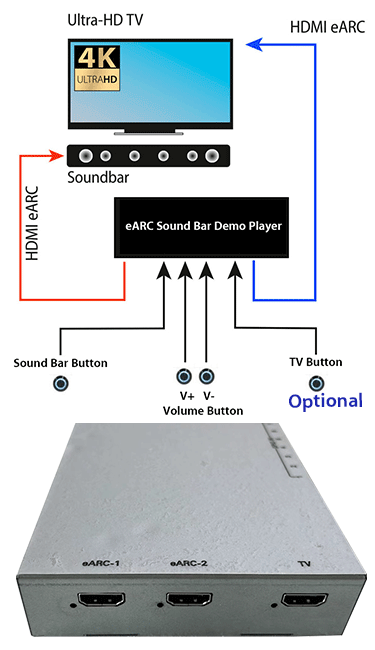
1-2.From TV to soundbar mode
TV-to soundbar mode
•Audio Source: HDMI output from the soundbar audio player is connected to the 4K LCD TV via HDMI.
• Video Signal: The 4K LCD TV processes the Dolby Atmos audio from the HDMI input and then outputs the video signal to the soundbar via HDMI.
• TV Role: The 4K LCD TV is responsible for displaying the video and decoding /passing through Dolby Atmos audio, while the soundbar receives the audio from LCD TV & soundbar audio player, all controlled by CEC commands.

1-3.Typical mode, soundbar & TV get dedicated HDMI ports
soundbar-tv typical mode
•Audio Source: HDMI output from the soundbar audio player is connected to the soundbar via HDMI.
• Video Signal: The soundbar audio player connects with 4K LCD TV via HDMI.
• TV Role: The 4K LCD TV is responsible for displaying the video, while the soundbar handles the audio processing, including decoding Dolby Atmos.

Summarize the above
• Audio-Visual Integration based on soundbar to TV mode :
When connected to a 4K LCD TV, the soundbar serves as part of a complete audio-visual system. The TV handles the visual component (video content), while the soundbar provides the audio output, including advanced surround formats like Dolby Atmos.
• Dolby Atmos Audio via eARC:
The TV is responsible for either decoding or passing through the Dolby Atmos signal. If the content supports Dolby Atmos, it’s typically sent from the TV’s HDMI eARC port to the soundbar.
• The soundbar processes and plays back the audio in Dolby Atmos format, providing an immersive surround sound experience.
• The video and audio are synchronized, creating an integrated experience where both the visuals and the audio (surround sound from the soundbar) work together to create a more engaging experience.
• Role of eARC:
eARC (Enhanced Audio Return Channel) allows for the transmission of high-quality, uncompressed audio signals (including Dolby Atmos) between the TV and soundbar. This enables lossless audio transmission for optimal sound quality.

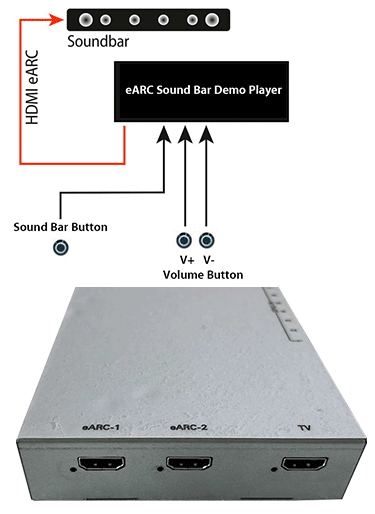
2. Pure Audio Player via eARC Port Without 4K LCD TV

Audio-Only Setup:
pure audio soundbar palyer
In this setup, the eARC port is used for audio transmission only, and there is no video source or display involved. The soundbar is connected to a media player or audio source device via eARC, but there is no visual component like a TV screen. The setup focuses solely on audio playback.
• Dolby Atmos via eARC:
The audio player (such as a dedicated audio player, a Blu-ray player, or a streaming device) sends the Dolby Atmos audio signal via eARC to the soundbar, which processes and outputs the audio, but there’s no video to accompany the sound. This means the audio experience remains the focus, but visual cues, such as synchronized movie sound effects or spatial audio related to the video content, are absent.
• Simplified Use Case:
This setup is generally used for audio-only systems, where the user may be looking for high-quality audio playback (like for music, podcasts, or audio demos) and doesn’t require a visual element. The eARC connection still allows the highest quality audio, but it’s not tied to the video content from a 4K TV.

Key Differences:

1. Role of Video:
• In the TV setup, the TV handles video output (4K, HDR, etc.) while the soundbar focuses on audio output.
• In the pure audio setup, there’s no video source; the soundbar processes and outputs only audio.
2. Dolby Atmos Integration:
• In the TV setup, Dolby Atmos is used as part of an integrated audio-visual experience, where video and sound complement each other.
• In the audio-only setup, Dolby Atmos is focused purely on audio playback, with no visual elements or synchronization.
3. eARC Usage:
• eARC with TV enables high-quality, lossless audio streaming alongside the video, offering an immersive, synchronized experience.
• eARC without TV is focused purely on audio, where the soundbar receives high-quality audio signals (e.g., Dolby Atmos) but without any video component.

Conclusion:
• Soundbar with 4K LCD TV: Ideal for a complete audio-visual experience with both video and Dolby Atmos audio.
• Pure Audio Player with eARC: Best suited for high -quality audio playback only, without the need for visual content.

eARC soundbar demo

The key difference is that when using a TV, you’re getting a full multimedia experience (both audio and video), while with the pure audio player, you’re focusing solely on audio quality without the video component.

For each specific branded soundbar with eARC port, the system layout is determined by the availability of I/O ports of the demo soundbars as well as the demo 4K LCD TV.

Categories
News Releases

USB-C headphone audio player- An All-in-one retail solution released!

Over the years, we have developed and engineered a wide range of retail demonstration audio players, from 16-bit /48KHz to 24-bit / 192KHz, from audio only version, audio & video, audio video with touch control, audio video sync with GPIO control from 3rd party device, these great retail audio solutions have supported quite a few international audio brands to deliver the seamless, engaging user experience in the retail shopping field.


But audio experience is evolving and our customers are adapting new technologies every year, today’s consumers are much informed and the latest audio products are becoming quite sophisticated, it brings some real challenges for the retail audio products demonstration. Some of them stay unsolved, for example, there is no all-in-one audio demo solution for USB-C headphones & speakers, 3.5mm stereo jack becomes old-fashioned now after iPhone 7 adopted Type-C audio port in Sep 2016, consumers get used to USB C port, they love them .


but there will be some challenges for retail audio demonstrations.

>3.5mm is analogue while Type-C is digital, most of retail audio players are still 3.5mm type for analogue audio output only.

>Type-C headphones & speakers require USB charging, even using analogue audio pins on Type-C to supply audio signal, USB power charging is still an issue.

>Most of USB-C audio products require fast-charging while USB 2.0 charging doesn’t work.

>Some USB-C headphones require linear DC power ( noise isolation ).

To solve the above mentioned challenges, many of our retail audio solutions need to be redesigned.


Today we proudly release our USB-C headphone demonstration audio player with built-in Type-C audio output.

Here is the demo video:

For most of Type-C headphone & speaker displays with A/B comparison listening, this is an all-in-one solution, as it is optional to come with 4x USB-C ports for multi-headphones demonstration, Optical Line-in & Line-out for devices cascading, analogue 3.5mm & digital Type-C together for all types of headphones, it supplies standard Type-C compliant digital audio and 500mA USB charging (fast-charging compliant ).


Categories
Design Process Development Engeneering News Releases

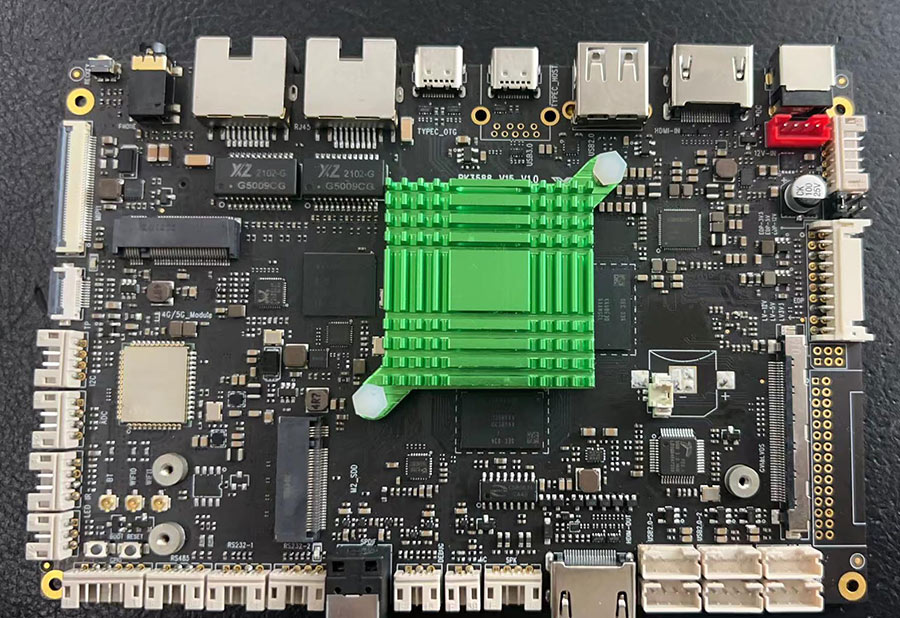
8K Signage Media Player RK3588 Released !

Our 4K media player Is Still Strong

5 years ago, we released our 4K media player with 512MB super small RAM and hardware video decoder, it has been proved as a great success in 4K digital signage category especially for the advertising scenarios for in-store product demonstration and 4K video looping for 7/24/365.

Customers need a future-proof 8K digital signage solution

Our customers like our 4K signage solution (MP40) very much, but MP40 was developed as a budget 4K player, it is a versatile solution with the most economic computing power. It is not designed to address the needs when customers require more computing power. Thus, Our clients keep asking us whether we have a 8K future-proof digital signage solution, even on roadmap level.

The New Flagship

Today, we proudly announce the release of our new flagship, the 8K media player powered by RK3588.8K digital signage player


Specification in brief:

  • CPU: 8 Cores,  4x ARM Cortex-A76 @ 2.6 GHz 4x ARM Cortex-A55 @ 1.8 GHz;
  • GPU: 4x ARM Mali-G610;
  • Memory: 8GB LPDDR4;
  • Storage:32GB–1TB EMMC;
  • HDMI Out: 2.1 8K/60Hz *1;
  • HDMI In: 2.0 4K/60Hz *1;
  • Type C: OTGx1, DP*2;
  • Ethernet: 1000MB RJ45x2;
  • Developer I/O: TTL/RS232*3, TTL/RS485 *1, I2C*1.
  • OS: android 12.

Product roadmap:

  • Daisy-chain video-wall monitor & media hub with 6x HDMI ;
  • 8K video demonstrator;
  • Any custom projects which require high performance computer power.

Interested ? for project inquiry, please contact us now.


Categories
News Releases

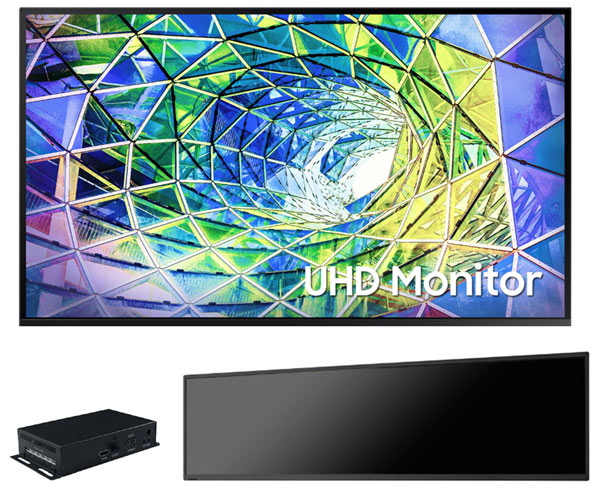
4K UHD Retail Displays

4K UHD Retail Displays

Available in Monitors, VideoScreens, Or Tablet Kiosks

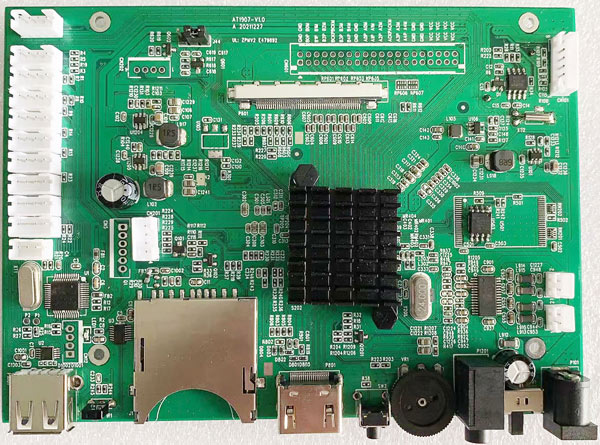
Introducing Mstar 6190 award-winning Smart TV based 4K Display Solution With Strong Video Decoder & Rich Panel Interfacing Options, More Importantly, The Exceptional Color Performance.

4k UHD retail display solution

Customization Options With Content & Peripheral Authoring Tools

Like Our Other Solutions With Unified Architecture For Interplay Of Hardware & Software, All The Interactivity Options & Play Control Commands Available in 1080P Versions Remain Unchanged In 4K Display Versions.

4K Mstar 6190 mother board

One-Stop Retail Solution With Product Life-circle Tech-Support

With Our Capable 4K UHD Retail Solutions, We Are Expanding Our Display Sizes Up To 86-inch, And We Are Still Working Hard To Address The Most Demanded Needs, To Innovate, Engineer, Design, Manufacture, Deliver The 100% Tailor-made Display Solutions With Product Life-circle Tech-Support. To Let Our Clients Enjoy Peace-Of-Mind While Focusing On Their Core Strength To Support More Brands & Enterprise End-users.

Interested in our 4K UHD Retail Display Solutions ? Send us an inquiry Today

Categories
News Releases

1080P Version Battery Driven Low Power Retail Video Solution, Released!

Battery Driven Low Power Retail Media Player Solution, Now Available for large sized screen up to 31.5-inch


Over the years, we have pioneered low power battery driven retail video players of small sizes up to 15.6-inch.

These Alkline D battery driven solutions have been receiving continuous positive feedbacks from the market and our clients, due to the unique features than no other:

  • Fastest user activation time within 2 seconds from standby mode to video reproduction;
  • Lowest power consumption that supports months of operation without maintainance;

However, this battery driven solution had limitation on the LCD panel resolution support, it supports up to 1366×768 pixels, the matched screen is 15.6-inch maximum.

Every year, we are asked whether this battery driven solution could be upgraded with 1080P support, and we keep selecting from various low power 1080P video player Soc and validate its performace in user activation interval and power efficiency.


After years of engineering & innovation, we are proud to announce the official release of our 1080P version low power retail video players.

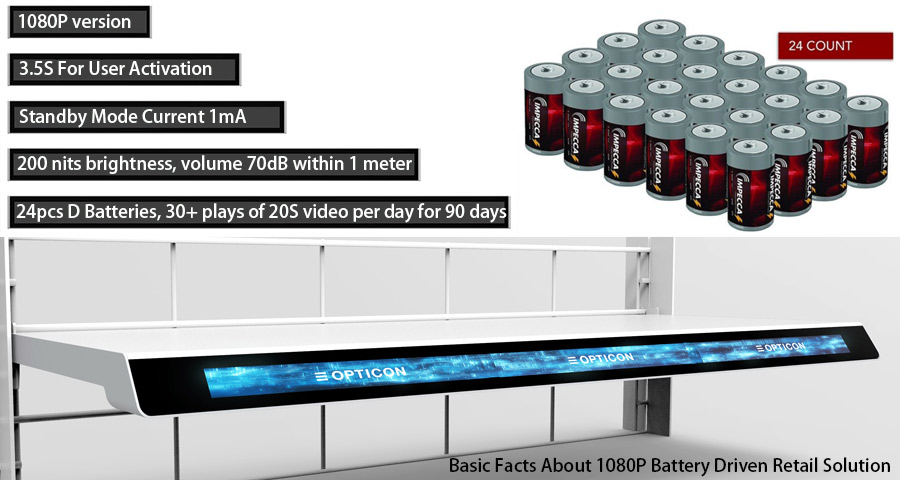
It supports up to 31.5 inch full HD screen with 3.5 seconds fast user activation, 30 times of 20-second video playback for more than 90 days based on 24 pcs D batteries.

basic facts about 1080P battery driven retail solution
Basic facts about 1080P battery driven retail solution

The validated learnings we got from such an innovative battery solution are more rewarding: larger screen ensures higher rate of shopper engagement, shorter video length required while delivering high impact advertising messages with multi-zone of video clips across the increased display area.


Let’s take 24-inch 1920×360 stretched screen for an example( 1/3 of 27-inch 1920×1080 pixels full 1080P screen). Its active display area is 597x112mm, about 3 times of 10.1-inch with active area 216x135mm. In terms of ads message graphic frames delivered with 2 or 3 display zones, a 24-inch stretched screen delivers 2-3 times of content than 10.1-inch screen. That’s to say:

  • For 24-inch screen, the same retail video for 10.1-inch, could be resized into 2 or 3 display splits/ zones, and reduced down to one third of video length, saying from 30 seconds to 10 seconds, 21 seconds to 7 seconds only; Shorter video length without compromise on ads message content means higher chance of user engagement.
  • Shorter video length means more video playback times, as the unit playback power consumption is reduced due to the decreased video length.


Sounds interesting and enlightening ? Let’s check its performance in terms of user activation interval and power consumption.

  • 3.5s: from user activation to video reproduction when user sees the video loaded.
  • 12V, 750mA for the whole unit of 24-inch video player.


Here are what we have validated, 20 hours of video loop 1920×360, 200 nits brightness, audio level 70dB within 1 meter of the display, based on 24 pcs of Alkline D batteries.

Conclusion: This 1080P version battery driven retail video player is competent to support the marketing goal of the retail field, supporting enough user activation times required over the designed operation period of 90 days.

Categories
Engeneering News Releases

Bluetooth Headphone Display Solution For Retail Demonstration, Updated.

Bluetooth® headphone demonstrators & Challenges From Retail Field

Since Apple cancelled 3.5mm headphone port in iPhone and Type C digital audio port has been introduced into Android smartphone ecosystem, the wireless Bluetooth® headphones and earphones are becoming mainstream, making wireless headphone demonstration retail system becomes a new niche, but there was so few presentable, useable Bluetooth® headphone demonstrators on the market due to some unsolved challenges from the retail showrooms.

Previously we have a bluetooth (wireless) headphone demonstration system using bluetooth dongles or bluetooth hub to get demonstration headphones paired and let user listen & compare music like another interactive headphone display.


Then we note some challenging issues from the field, the daily maintenance, and yes, it is not maintenance-friendly, it requires the following operations daily:

  • keep the headphone charged when needed so that they have enough battery power ( thus, this may require local store staff turn off the headphones, and connect them to USB charging cables )
  • Other than the charging, every morning, local store staff need to disconnect the headphone from the charging mode and power them on;
  • Pairing and testing: so that the system works as expected, though the pairing is almost automatic, but it is not 100% equally consistent.

Validated Learning From Previous Wireless Headphone Display Projects: Charging & Pairing Are Troublesome

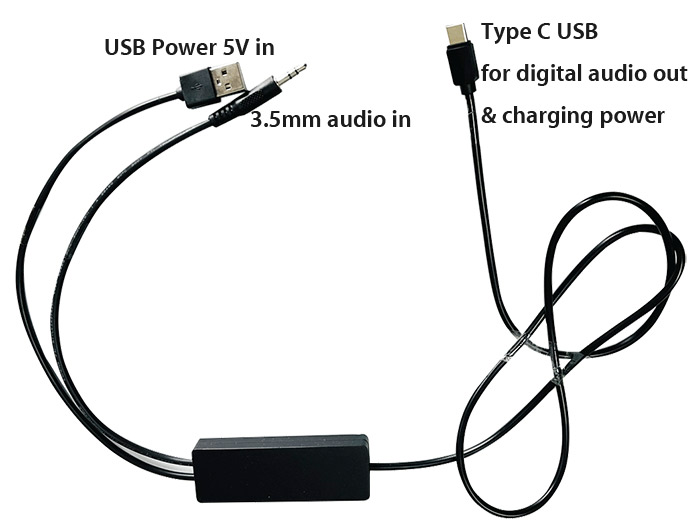
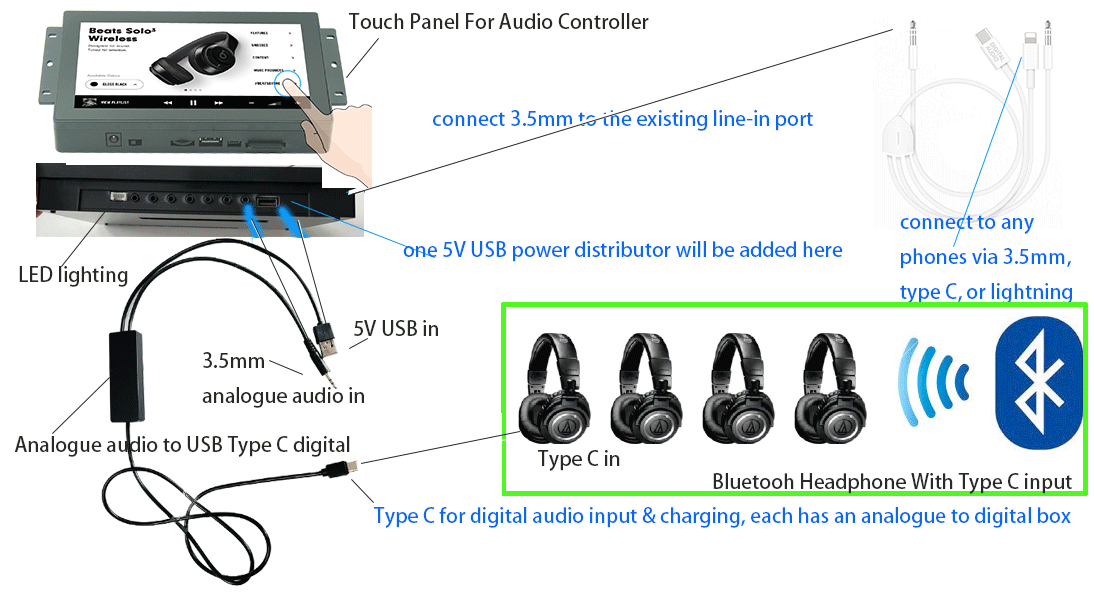
Knowing that charging and pairing will be one-solved-issue-creating-another, we developed a new, better solution utilizing the analogue to digital (USB) adapter to turn our existing headphone demonstrators compatible with bluetooth headphone with type C digital input, then charging will never be a problem, and the demo headphones are type C connected, thus bluetooth pairing is not needed any longer.

analogue audio to USB Type C digital and charging power
Analogue to Digital USB Type C Adapter

Customer Audio Line-in, Personal Audio Demonstration

Customer audio line-in is also no problem , as users could use the 3.5mm to type C/lightning adapter cable and connect it to the existing line-in 3.5mm port directly.


The final diagram will be as the following:

Bluetooth headphone demonstrator
Bluetooth Wireless Headphone Demonstration System Illustrated


Thanks to this universal analogue to digital audio adapter, all our existing headphone demonstrators can be seamlessly integrated to support wireless Bluetooth headphones with Type C USB digital input.

Categories
News Releases Uncategorized

How Sound Bar Demonstrator Supporting Dolby Atmos Works

How Sound Bar Demonstrator Supporting Dolby Atmos Works.


Dolby Atmos is an object-based sound system, it has become now the benchmark for at-home surround sound. The format is now widely available from Ultra HD Blu-ray discs and streaming services like Netflix, Amazon Prime Video and Disney+.


What exactly is Dolby Atmos ?


Dolby Atmos isn’t actually a soundtrack at all. It’s metadata that is used by compatible audio gear to control which speakers are reproducing certain sounds. A good example is when a aircraft flies overhead in a movie. Without Atmos information, the sound of the aircraft is embedded in one, or many, of the surround sound channels. But so are all of the other sounds you’re hearing.

Dolby Atmos Explained

With Dolby Atmos, the aircraft is treated as its own discrete object, and a Dolby Atmos receiver can use that information to separate the aircraft sound from the background sounds and move it independently from one speaker to another. The result is a very convincing 3D placement of sounds for a much more immersive movie experience.


There are many Dolby Atmos-compatible sound bars, and they can get access to Dolby Atmos content then deliver Dolby Atmos sound, that’s it ?


Technically, yes, but actually no.


For retail display manufacturers or sound bar brand end-users, they are facing the following challenges:


  • the sound bar demonstrator or soundbar audio player is not Dolby Atmos compatible if they use OEM media players;
  • the brand audio players which are Dolby Atmos compatible are not re-programmable, that’s to say, they could not build customized, interactive shopping experience;

Sound bar demonstrator supports Dolby Atmos

AOK Display’s solution is very simple.

we take advantage of the pass-through capability of our 4K UHD sound bar demonstrator, to let the audio player send the raw audio data to Dolby Atmos Compatible receiver (the demonstration sound bars ) decode the Dolby Atmos content directly. Thanks to CEC control, we could program interactive user flow and control the following user elements:

  • playlist,
  • volume increments,
  • default volume,
  • audio timeout,
  • default loop file,
  • default status: loop, mute on/off, standby,
  • playlist matcher,
  • CEC control
  • LED retail lighting patterns


All those will be tech-free done with a XML based text file, with simple syntax we defined.


To get the detailed instruction on how we make this revolutionary Dolby Atmos Sound bar retail demonstration solution, please get the user manual below:


User-Manual-For-Testing-Dolby-Atmos-Soundbar-Demonstrator